To be a Fly on the Wall in a Video Conferencing Room
 To be a Fly on the Wall in a Video Conferencing Room by UCStrategies Guest Contributor
Can interop software stop the calls to the A/V guy?
Business users find it hard enough to start a video conference with colleagues in the same enterprise on similar equipment. Add the complication of connecting to another brand of VTC equipment and you can assure the presence of an IT administrator at the meeting (and a few cynical comments from conferees).
Yet for all the trouble of starting and managing meetings, users still rank videoconferencing as the second most productive communications tool at work, slightly behind everyone’s favorite (?), email. Email’s simple: Simple Mail Transport Protocol allows sending messages between public and corporate Exchange systems. But video protocols change rapidly and the race to innovate is fierce.
The challenge of interoperability between different video systems was highlighted with Microsoft’s release of Lync 2013. Prior to this release, Microsoft had interoperability with Polycom, Cisco/Tandberg, LifeSize, and many others, using H.263 protocols. Lync 2013 updated the protocol to H.264 SVC which rendered interoperability to existing Tandberg/Cisco MXP endpoints and VCS Control systems useless. Since then, Microsoft has continued to press for adoption of H.264 and is working on backward compatibility plans. Don’t blink, because H.265 is on the horizon. With users increasing adoption on UC clients and mobile devices, connectivity between disparate systems and protocols must be made simpler, nimbler.
Sophisticated video networks come at a high cost. Large corporate video systems are comprised of bridges, MCUs, gateways, streaming solutions, bandwidth optimizers, and big pipes. It’s a big investment that some CEOs approved in the heyday of telepresence, but since then have pared back due to vague ROI and changes in user adoption for video.
“We were evaluating bridging solutions from three different vendors,” said Chris Ellen, Unified Messaging Team Lead at Arup, an 11,000 user organization with 90 worldwide offices. “However, we found these to be more complex than needed – they required proprietary hardware and could not achieve satisfactory interoperability and HD video integration with Microsoft Lync,” he continued. To contain the cost of delivering scalable multiparty/multivendor video, something other than hardware, DSPs, and ports is needed.
Pexip is a one-year-old company with an interesting model. The approach of these ex-Tandberg engineers is to build gateway and MCU functionality in software deployed on business-class virtual machines, rather than embedded in hardware. Their software acts as a gateway, handling the protocol changes needed to make disparate video room systems (and Lync) interoperate. “For Arup, minimal to no investment is required to start deploying the solution as we can utilize existing infrastructure,” said Ellen. “Being virtual also means conferencing capacity can be increased within minutes and the platform is inherently redundant.”
Even if an IT team can master protocol interoperability, how many of them get excited to hear about expanded video conferencing usage? They know more video equals more bandwidth, congestion, network planning, and monitoring. They’ve reason to fear the prospect of a large multiparty video call, because each video user will soak up between 256kbps – 2Mbps in unicast traffic. Yes, each. That’s a lot of traffic to manage.
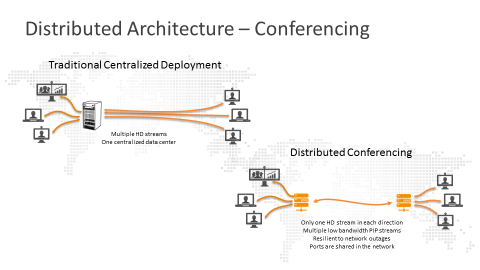
| Deployment of Pexip’s software in multiple locations optimizes the bandwidth utilization between sites. Instead of the endpoints sending unicast streams end-to-end, Pexip’s software aggregates a single stream across the WAN to its partner node, which breaks out the stream and sends to multiple recipients at the far end. Extending this model across many sites makes it much easier to predict bandwidth usage and QoS settings. |
 |
While Pexip’s software does have MCU functionality as well, enterprises with Lync who prefer to have Lync be the MCU can do so. Pexip’s gateway translates the video and the desktop sharing protocols so that remote VTC room users can see video and content shared by Lync users.
“With Pexip Infinity’s native support of Microsoft Lync, IU now has a truly unified communications environment,” said Steve Egyhazi, principal analyst-multimedia, IU Collaboration Technologies. “When users know they’ve got easy, instant access to the bridge from any device or room” he continued, “videoconferencing becomes just another app, like email or chat.”
Pexip’s options to pay on a per-user model or on a per-port model gives customers a choice. Most are predicting the amount of meetings involving Lync and traditional systems and estimating the number of ports. Getting it wrong initially isn’t crippling, because unlike hardware systems no physical upgrade is needed to scale, just more licenses and possibly VM resources. “Using a flexible licensing structure, the software’s cost of operation is far below the market rate, resulting in an extremely cost-effective tool for public-sector settings such as educational environments, said Lea Castillo, Manager, Texas Education Telecommunications Network (TETN).
“At the end of the day, it lets us communicate the way we want to without the restriction of buying more software or hardware” said adopter Quinn Copeland, Manitou Americas. “We have Lync integrated as well and we still leverage 90% of our existing Polycom systems and software.”
By making some reasonable investments in software running on familiar server Operating Systems, IT pros may well get some more time back when users can run meetings on their own, while users can get a full unified video and sharing experience across platforms.
Christian Stegh is the VP of Strategy at Enabling Technologies.