CoS and QoS - Managing Bandwidth, Complexity, and Cost
 CoS and QoS - Managing Bandwidth, Complexity, and Cost by Phil Edholm
One area of networking technology that has been heavily discussed, but less well actually understood is the topic of QoS or Quality of Service. Within the umbrella of QoS are a number of concepts, technologies and implementations, which all provide different mechanisms for solving fundamental bandwidth management issues. The key point of QoS is to assure that the network allocates resources based on the needs of the traffic and the business policies. One key aspect of this area is the difference between CoS - Class of Service, and QoS. While CoS is often part of a QoS implementation, CoS alone can provide a valuable allocation mechanism capability of many if not most of today's networks.
The intent of this white paper is not to detail the technology choices per see, but to clarify the options at system level and to have clear understanding of how these choices will impact a deployment. With the advent of video and the resultant increase in bandwidth over audio only communications, understanding this area is even more critical for network, applications and communications operations.
This paper is written assuming that the reader understands the basics of transmission of realtime media streams over a packetized IP network. It is assumed the reader is familiar with the concepts of latency and the impact on human interaction perception as well as the overall systems latency issues in packetized media streams. As QoS and CoS are tightly tied to both packet loss and jitter latency, these factors and how the Cos/QoS mechanisms work will have an impact. The PKE Consulting White Paper, "Making IP Networks Voice Enabled" will clarify these issues and can be found at www.pkeconsulting.com.
Bandwidth Demands of Real Time Services
Real time media streams have bandwidth demands based on three factors, the resolution of the media, the effectiveness of the codec, and the frequency of packet transmissions. Each of these three factors contributes to a lesser or greater bandwidth.
Audio Bandwidth
Generally audio/voice streams are at least an order of magnitude less than video. Voice is easier to understand as it has fewer variables. In voice transmission, the basic PSTN mechanism of PCM (Pulse Code Modulation), samples the audio stream at a rate of 8 Kbps with a resolution of 8 bits per sample. The resulting bandwidth is 64Kbps. For contrast, an audio CD is sampled at 44.1Khz and a sample of 16 bits. The resultant monaural bit rate for a CD is about 705 Kbps or 10x the PCM rate. The reason for this difference is twofold; the sampling rate of PCM reflects the fact that most human speech is under 3.5 Khz frequency, the limit of frequency for an 8 Khz sampling (search "Nyquist–Shannon sampling theorem" to understand this better). The CD rate enables frequencies of up to about 20 Khz, generally considered the limit of human hearing, In early tests of digitized voice transmission, it was realized that for human speech, a limited frequency range as well as a limited dynamic range was acceptable. However, as digital capabilities have improved, it has been proven that a wider bandwidth audio connection is perceived as clearer and less tiring. Generally, what is called HD audio is at rates that are similar to CD. This typically increases both the sampling rate and the dynamic range through larger samples.
The next step in the audio/voice stream is compression. Just as the MP3 codec allows a CD to be compressed down to 64 Kbps for Monaural (128 Kbps for stereo) for storage in a portable player, a realtime media stream can be compressed. While compression rates for PCM are generally less due to the concentration of information in a limited audio band, compression of PCM level streams to 16 Kbps has been shown to have little noted impact in human tests. However, compressed wideband audio using MP3 or other compression techniques is always judged as superior to uncompressed PCM at the same 64 Kbps bandwidth. For these reasons, planning for a 64 Kbps stream is probably a reasonable path for audio/voice bandwidth planning. The final point is that the compression/media engine also has the capability of doing silence suppression. If a specific user is not talking, then the node will not send packets at the normal rate. This has a significant impact on real traffic and presented bandwidth. In a 2 party conversation, except in rare instances, only one of the parties is talking at any time. In a multi-person conference, there will always be a bridge out to client stream, but the uplink streams from the clients will be based on who is talking. If silence suppression is implemented, it can reduce bandwidth by 50% or more compared with non-silence suppression. It is safe to assume a 25% reduction if a good silence suppression technique is used.
The final variable is the frequency of transmission. As humans are sensitive to latency, this is impacted by that. In this case it is the "CSMA/CD" latency that is significant. As was detailed in the "Making IP Networks Voice Enabled" white paper, a reasonable limit for this is 250-300 msecs, resulting in a packet of 20msecs of media time being optimal for latency and network bandwidth.
The result of these factors is an audio media steam that is typically 64 Kbps for mono (PCM or compressed HD), or 128Kbps for stereo/spatial applications. As stereo and/or spatial applications are not common today, the 64 Kbps rate is reasonable. Also, if they emerge, true multichannel solutions will require higher bandwidth. The resulting 64 Kbits of data every second is distributed across the 50 packets (at 20 msecs per packet), resulting in a packet size of 1,280 bits or 160 bytes. With the IP headers (16 bytes) and Ethernet frame(38 Octets/bytes including inter-frame gap) typical on today's networks, the result is an average packet of 214 bytes (160+16+38). This results in an average on-net bandwidth of 85.6 Kbps or a packet overhead of 33.75%. If the stream is reduced to 16 Kbps, the result is smaller, but less efficient. At that rate, the transmitted bandwidth is 40 bytes per frame and the resultant frame size of 94 bytes results in a on-net bandwidth of 37.6 Kbps with a packet overhead of 135%. The reduction of 75% in actual media bandwidth results in only a 65% reduction in on-net bandwidth due to the constant packet transmission.
Finally, the impact of silence suppression needs to be factored. A simple assumption is that a well designed silence suppression system will reach, on average close to 50% reduction in bandwidth, as on average only one of the parties is speaking. While this is ideal, it is not practicable, as often background noise or other factors will cause transmission. So, while silence suppression probably reduces the bandwidth somewhat, the conservative approach of assuming that each voice/audio stream is 85 Kbos is what will be used later in this paper.
Video Bandwidth
The factors in video bandwidth are similar, though the potential range of resulting bandwidths are much larger. For this reason, it is relatively difficult to pick a single video bandwidth as representative.
For resolution, video ranges from web cam (300x200) pixels up to large multi-screen telepresence systems (3x(1920x1080)). Just assuming equivalent compression rates, this is a range from 1 for the web cam to 104 for the telepresence system. In other words, the telepresence system has over two orders of magnitude more bandwidth requirement. So is a webcam can be done at 100 Kbps, the telepresence system will use 10 Mbps. Note that these numbers include the same frame rate, another critical video factor. As human eyes "average" frames, a video frame rate of 30 frames per second (FPS) is generally considered good enough. This is the frame rate of commercial television. In fact, the eye mechanisms for "scrapping" the photon images from the rods are close to 60 FPS, so that rate is better.
If the codec is designed to run at this rate, the actual bandwidth of having a higher frame rate is not double, but a smaller percentage. The big advantage of 60 FPS is that the latency is now equivalent to the voice 20 msec latency. At 15 FPS, the frame gap is 66 msecs, and this often results in noticeable delay. For these reasons, video systems for true business value are typically running at 30 or 60 FPS.
While the actual bandwidth for a video session is variable based on the size of the displays and cameras used, the frame rate, the compression algorithm chosen and the specific vendor's implementation of all of the above, a few data points as of early 2012 can be used to define video requirements.
- Telepresence - 5-15 Mbps - based on Polycom and Cisco claims for their systems - includes content and 60 FPS
- 1920x108 HD - 1.8-2.8 Mbps - Cisco, Polycom and Lifesize documentation -typically 60 FPS
- 720 HD - 512- Kbps - 1Mbps - Cisco, Polycom and Lifesize documentation - May be 30 FPS
- Apple iPad 2 FaceTime video - 350 Kbps in either direction per Aruba planning for FaceTime documents. Based on 30 FPS frame rate for iPad, not 15 FPS for iPhone
Anything less than the above is not really business video. For planning purposes, there should be four rates of video established:
- Multi-screen telepresence - 10 Mbps
- Single Screen 1920 - 2 Mbps
- Desktop HD - 750 Kbps
- Portable Device - 450 Kbps
While these numbers are not absolute, they will show how CoS and QoS can vary when applied to networks and transports.
Understanding and Using CoS
Class of Service is based on a very simple concept. In an Ethernet switch, packets arrive on the ports. The packets are then stored and forwarded to another port. Assuming that the total bandwidth of the arriving packets and the ports they are going to is less than the available capacity (30% or less) than the actual bandwidth of the ports and networks), the switching will not be congested. While there is still an potential issue when a device sends a large number of packets in a TCP/IP stream and those packets are in front of a realtime packet, the impact is not large. For example, on a 100 Mbps port, a burst of 16 maximum size packets is equivalent to a delay of 2 msecs. for a packet that has to wait for the others to be transmitted.
The Ethernet switch can only make two decisions when there are more than one packet in the queue for a specific port; it can decide which to transmit first and, in the event that the queue becomes close to full, which one to discard first. These two mechanisms are generally referred to as "Priority," and "Discard." The priority mechanism is simply which packets in the queue get sent first. Absent any other mechanisms, this is typically a first-in, first-out mechanism. The discard is more complicated as it is based on a feature of TCP/IP. In TCP, when sending a long file, the transmitting node can send multiple packets without an acknowledgment of receipt from the receiving device. This allows much higher transfer speeds, especially over long distance links or higher latency paths. TCP protocols start with one packet, going to 2, 4, 8, and so on, continually building the number sent until a maximum number set ate the sender is reached or a packet is lost. When a packet is lost, the TCP steps back to the lower value. The result is the increase in bandwidth as the flow starts (this can be seen in the timers that often start large and drop quickly on file transfers). In the IP protocol, the concept of Random Early Discard (RED) is designed to take advantage of this. When a queue approaches being full, randomly discarding some of the packets essentially throttles down a random IP flow. This reduces the total bandwidth demand and reduces congestion. This works well for TCP flows, but for realtime flows that use RTP and transmit every 20 msecs it has no impact.
Generally, within a network a small set of different traffic "classes" are created. In packets these are generally marked as a type by the DiffServ bits in IP or the 802.1Q bits in Ethernet. For each class, a specific priority and discard can be specified. For purposes of clarity, this paper will only consider a simple system of three classes; a realtime class, a business applications class, and a general internet access class. For a port, there will generally be a queue for each traffic type, segregating the traffic. Classes are generally configured in one of two ways. For some classes, priority is set as absolute, meaning that if a packet from that class is in its queue, it will be sent first, regardless of other traffic. The other mechanism is to specify a percentage of traffic to be sent first from each queue and then the first packet in that queue is selected. Generally realtime traffic is prioritized as first priority absolutely, while business and general Ethernet traffic uses percentages, often weighted to favor the "business" traffic (60/40 in favor of business for example). The result is that when a realtime packet arrives in the queue, it will be sent immediately, in front of all the other packets. If five realtime packets arrive in a row, they will all get priority. If there are no realtime packets in the queue, a packet will be selected from one of the other two queues based on the percentages (with the 60/40 example, for every 2 packets from the general internet queue, 3 will come out of the business applications queue). Similarly, discard can be configured as absolute or percentage. So when a set of transmit queues for a specific port reaches a level of fill (typically 60-80% of capacity), the RED process will kick in. As the realtime queue has a "never discard" policy, no realtime packets will be selected to be discarded. For the other queues, random packets will be discarded, often with a higher percentage of discards from the general internet queue than from the business applications queue. The result is that in congestion, the realtime packets always go first with little delay and are never discarded. The business applications traffic will receive a larger percentage of the remaining available bandwidth due to the percentage RED and the packets, on average will also have lower delay.
Applying RED to realtime flows has two negative impacts and no positive value. As there is no sliding transmit window like TCP, throwing away a RTP realtime packet does not slow down the flow, it just degrades the quality. Further, depending on where the packet is discarded, all of the effort expended to get it to that point is wasted if it is discarded. For these reasons, never discarding is just as important to quality as the always transmit first is to latency.
| An interesting analogy for CoS is the carpool lanes that many US states have put into their freeway systems. Assuming that the relative number of cars per lane is less than in the non-carpool lanes, these lanes that have a priority/never discard move at a much faster rate. In fact, if a carpool lane has a small number of cars in it, it will move at a speed totally independent of the speed in the other lanes, which may be totally stopped. This is essentially what happens when a class is created that has absolute priority and never discard. It will take up whatever bandwidth it needs to send the packets and the other classes will be forced "out" of that space. If there is sufficient bandwidth at a system level, the realtime class will operate at the "bottom" of the network without having any real impact on the rest of the network. Figure 1 shows a gigabit Ethernet uplink from a wiring closet with the three traffic classes. If this is just a voice analysis, we can quickly calculate how much realtime voice bandwidth there will be. If we assume that the wiring closet that this uplink supports has 200 users, the maximum bandwidth if every user is one a VoIP connection with 64Kbps media bandwidth and no silence suppression is 17.2 Mbps or just 1.72% of the available 1 gigabit of bandwidth. |
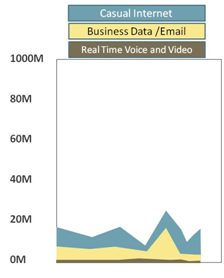
Figure 1. LAN Uplink Bandwidth
|
If we assume that only 50% of the employees are on the phone at the same time and that silence suppression is reducing 25% of the traffic and there are redundant load sharing uplinks, the result is a reduction to only 3,21 Mbps per uplink, or less than .5% of the available bandwidth. If that bandwidth is essentially not available to the other apps, they will not notice at all. So, with sufficient bandwidth, simple CoS results in good outcomes for both the realtime and non-realtime traffic. Typically in today's LANs with 100 Mbps or gigabit to the desktops and 1-10 gigabits in the wiring closet uplinks the bandwidth is more than enough for voice traffic. The same is true for small branch offices where the voice bandwidth is limited by the number of users. If a branch office has a 1 Mbps WAN link and only three employees, the maximum bandwidth, when all three are on the phone, is 256.8 Kbps or about 25% of the bandwidth. Generally, with only 1 or 2 at a time and silence suppression this number would drop to under 100 Kbps or 10%. Again, using simple CoS is sufficient.
| While video is much higher bandwidth, the use, at least today is less. Take the same wiring closet example and assume that 50% of the wiring closet employees are on video calls and they are using an average of 1 Mbps for the video session (mix of 1080 and 720 HD and some iPads). This results in a uplink bandwidth demand of 100 Mbps, or 5% of a 2 gigabit dual uplink configuration. So, even for a lot of video traffic, CoS will work well in the LAN and even in some WAN configurations. Figure 2 shows a video demand uplink. Similarly, if the branch has a 5 Mbps WAN connection and three employees, the 3 Mbps for all on video at the same time is 60%, so it is OK, but probably a 10 Mbps link is safer. However, if the odds of all three doing video at the same time is low, then the 5 Mbps would be OK. If we can do voice and video with CoS, why do we need the more complex QoS? We do not need QoS to enable realtime, we need it to protect the other classes from being blocked out by the real time traffic. |
|
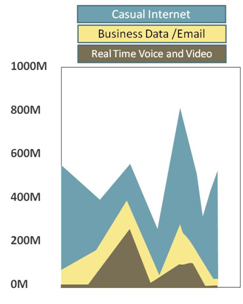
Figure 2. LAN Uplink Bandwidth with Voice and Video |
Extending CoS to QoS
The challenge comes when the traffic is being put into a network connection that, through its limited bandwidth, is going to potentially cause congestion. Figure 3 shows what happens if we try to take the network traffic from Figure 1 and squeeze it into a low speed connection of about 2-3 Mbps. I know it is not realistic to assume all of the bandwidth goes to the WAN, but if this was a large remote site with centralized VoIP servers and SIP trunking and data center applications, it is what would happen. On the top right, the demand is much higher than available, and the result is that the priority and RED delivers a flow as shown on the bottom left. The realtime traffic, with the absolute priority and never discard class policy continues to use the bandwidth that it would have on the LAN, but all that is left for all other traffic classes is what it does not use. This has two impacts, the available bandwidth is reduced overall, but, at certain times there may be zero bandwidth left for the non-realtime traffic classes.
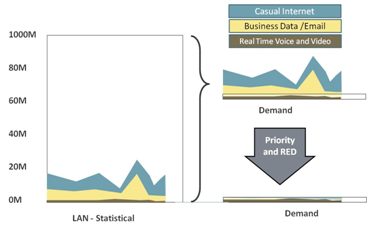
Figure 3. Impact of low speed links with only CoS and Voice
Similarly, video will have the same demands. However, as the bandwidth is larger, the impact of different classes of traffic is more visible. Figure 4 shows a network with much higher realtime bandwidth demand as a result of video. As the traffic is transitioned into the WAN at the upper left, the bandwidth demand exceeds the capacity. As before, the use of CoS generates a flow as shown in the bottom where the realtime class occupies most, if not all of the bandwidth much of the time.
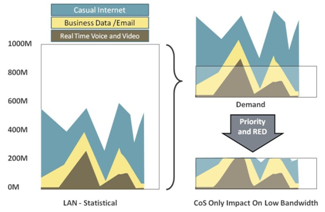
Figure 4. CoS Only on Lower Speed Link
Figure 5 shows what happens if the realtime traffic is exposed to RED. While this is not a clear view it would reduce the bandwidth somewhat, but the result would be lost packets, not a reduction in the number of sessions, probably resulting in really bad quality on the realtime media sessions.
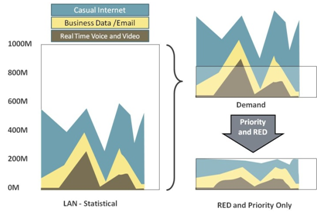
Figure 5. Applying RED and Percentage Priorities to Real Time on Lower Speed Link
QoS generally includes a CoS mechanism to manage classes and switches, but then adds an additional capability; admission flow control. What admission flow control does is to limit the number of realtime flows so that the bandwidth they occupy is defined and controlled. For example, if we limit the number of voice calls on a link to 10 maximum, the voice traffic will never use more than 856 Kbps (10 x 85.6 Kbps). Similarly, if video is limited to no more than 10 720P HD sessions at 750 Kbps each, the video will never use more than 7.5Mbps. Figure 6 shows how QoS with admission flow control impacts the traffic. As can be seen in the lower left, the realtime traffic peaks and is limited based on the definitions in the admission flow control mechanism. The result is that defined amount of bandwidth is available for other traffic classes.
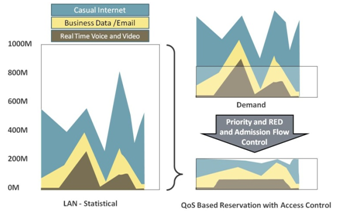
Figure 6. Admission Flow Control Applied to Realtime traffic and RED/Priority to Other Classes
In the earlier traffic example of the freeway system, admission flow control can be thought of as the metering lights on the freeway on-ramps. In many cases there are separate lanes for metering lights for carpools and single drivers, resulting in different levels of entry. With road density monitoring, the rate of these lights to admit new cars can be controlled by how many cars are already on the freeway.
Admission flow control can be based on multiple inputs. It can be simply a limited number of flows. Or it can use the current number of flows and bandwidth to decide if a new flow requesting bandwidth can be admitted. Or it can use policies to actually terminate one flow if a new higher priority flow requests bandwidth. As this is not intended to be a tutorial on standards and proprietary admission flow control schemes, suffice it to say this is the big value that QoS adds.
Conclusions
In today's world where bandwidth prices have dropped on LANs to low levels and new access technologies such as Optical Ethernet and cable service are increasing the bandwidth to branches, simple CoS is a viable option for many sites and locations. However, a clear view of when bandwidth is limited and the realtime traffic can starve the other classes if given CoS absolute priority and never discard is important. By implementing a clear CoS strategy across the organization and having a mechanism for admission flow control at the lower speed links, a solution that is easy to administer where bandwidth is cheap and more complex where it is expensive can be delivered. The tradeoff between CoS and QoS is a simple one of complexity and cost.