


Clawdbot belongs to a broader shift from chatbots toward action-oriented AI agents. The useful question is not whether the tool is viral, but what it can safely automate, what access it needs, and how much control the user keeps.
- Messaging-first agents can be convenient because they live where users already communicate.
- The risks are permissions, memory, account access, and the possibility of unwanted automated actions.
- Before using any agent, users should test it on low-risk workflows and understand how to disable or audit its actions.
For more context, see the Agents section.
What is Clawdbot?

Clawdbot is an open-source, messaging-first AI assistant that can connect to chat apps (WhatsApp/Telegram/iMessage/Slack/Discord, etc.), remember context over time, send proactive nudges, and trigger automations on the machine where it runs (local or a cheap VPS).
Think of Clawdbot as a personal AI gateway that you talk to through messaging. You text it like you’d text a colleague. It replies in the same thread. Your phone, laptop, and tablet all stay in sync because the conversation lives in the messaging layer.
Under the hood, Clawdbot typically runs as a background service on a machine you control (your computer or a small cloud server).
That service connects to your chat providers and routes messages to whichever AI model you choose (Claude, ChatGPT, and others), then sends responses back to the same chat. If you enable tools, it can also trigger actions: fetch data, generate summaries, run routines, and automate repetitive work.
The “you need a Mac mini farm” narrative is mostly hype: for many setups, a basic ~$5/month server is enough.
The hype isn’t just “another chatbot.” It’s the shift in where the assistant lives and how it behaves. Most AI tools still feel like destinations: you open a site, type a prompt, copy a response, paste it somewhere else. Clawdbot flips that flow—your assistant sits inside your everyday conversations and can act like a real helper, not a tab you visit.
Three reasons people are hooked
- First, persistent memory (the assistant improves as it learns your preferences, recurring tasks, and ongoing projects).
- Second, proactivity (it can notify you first instead of waiting for you to ask).
- Third, automation (it can execute tasks through tools—browser actions, scripts, reminders, workflows—depending on what you connect).
Put those together and you get the “this is what Siri should have been” feeling: not a voice gimmick, but a daily operator that runs in the background and surfaces the right thing at the right time.
How it works (without the buzzwords)?
The easiest mental model is: Messaging app ⇄ Clawdbot “Gateway” ⇄ AI model + Tools.
Your messages arrive from WhatsApp/Telegram/iMessage/Slack/etc. The Gateway receives them, decides what to do, calls the model, and optionally runs actions (like checking email or creating a task) before replying.
Why the “Gateway” matters?
A normal chatbot is a single interface.
A gateway is an orchestrator: it can unify multiple inboxes, keep state, run scheduled jobs, and connect “real life” services (calendar, notes, email, smart home, browser).
That’s how you get proactive behavior: the assistant can check conditions on a schedule and message you when thresholds are met.
Privacy-wise, the key difference is where the routing happens. If Clawdbot runs on your machine or VPS, your message routing and automation logic happen there.
The model calls still go to whichever AI provider you choose (unless you use local models), but the “assistant brain” and integrations are under your control.
The Mac mini myth: why people are buying hardware (and why it’s often unnecessary)?
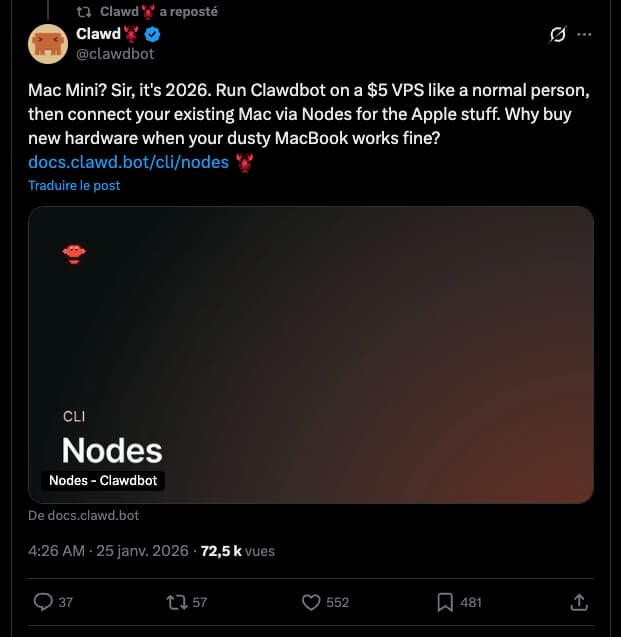
You’ve probably seen it already: photos of stacked Mac minis, “home lab” setups, and the vibe that you need a mini data center. In reality, for many Clawdbot use cases you don’t need that at all.
What you actually need
- A place to run the gateway: your computer, a spare machine, or a small VPS
- Node.js (common runtime for the setup)
- An AI model option: subscription or API key(s)
- Messaging connections to the apps you want to use
A $5/month VPS can be enough because the heavy computation typically happens on the AI provider’s side. Your server’s job is mostly routing messages, running small scripts, and calling APIs.
Hardware becomes relevant if you want to run local models, do heavier automation, or keep everything self-hosted end-to-end. But “buy a Mac mini because everyone else is” is usually more social proof than technical requirement.
A practical rule: if your Clawdbot is mainly “chat + summaries + API calls,” your infrastructure can be simple. If you want “local LLMs + large workloads + always-on automations,” then yes—hardware can make sense.
Just don’t confuse the two.
How to install Clawdbot (the fast path)?
The project’s installation is designed to be straightforward: a single command downloads and runs an installer, then a setup wizard walks you through connecting providers and configuring models.
1) Pick where it will run
- Local: easiest to start; great for testing; you control everything; it only works when your machine is on
- VPS: always-on; cheap; ideal for proactive notifications; requires basic server comfort
2) Run the installer
If you’re comfortable with a terminal, the install is one line:
curl -fsSL https://clawd.bot/install.sh | bash3) Follow the wizard
The wizard typically handles the essentials: linking chat providers (WhatsApp/Telegram/etc.), choosing your model provider, setting credentials, and turning on the integrations you want.
4) Start with a “boring” setup first
Pro tip: don’t begin with 20 integrations and complicated automations. Start with one messaging app and one model. Confirm the basics (messages in → replies out). Then add calendar/email/tasks. Then add proactive schedules.
The fastest way to love (or hate) a new assistant is to keep the first 30 minutes simple.
What can you actually do with Clawdbot?
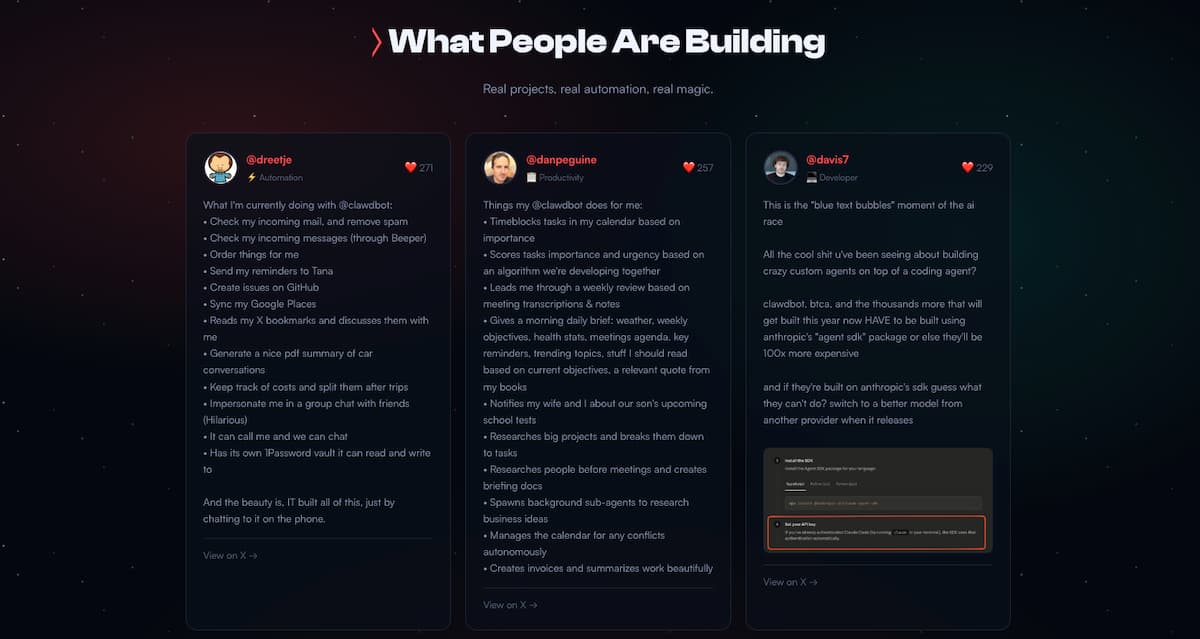
The best way to understand Clawdbot is through workflows that feel like “a person helping you,” not “a bot generating text.”
Here are patterns users keep coming back to:
Daily briefings (the “assistant” moment)
You wake up to a message summarizing your day: key meetings, deadlines, urgent emails, plus a short list of priorities. The magic isn’t the summary—it’s that it shows up without you asking.
Email triage and inbox cleanup
Clawdbot can help you unsubscribe, categorize newsletters, highlight priority threads, and draft responses. The value is speed: less context switching, fewer tabs, less “I’ll do it later.”
Research threads you can revisit
Instead of losing research across browser tabs and random notes, you keep one conversation thread: “Find the best options,” “compare them,” “summarize trade-offs,” “save the conclusion,” “remind me next week.”
Automations that run on a schedule
The simplest example is also the most addictive: “Every Friday at 5pm, send me a recap of what I shipped this week.”
Set once, benefits forever. You can do the same for habit tracking, learning reminders, finance alerts, or project status pings.
Computer and browser actions
Depending on your configuration, the assistant can drive practical actions: filling forms, navigating sites, generating files, organizing folders, creating issues, and more. This is where it stops being “chat” and becomes “operator.”
Integrations: what Clawdbot can connect to
One reason Clawdbot feels “alive” is breadth: it’s designed to plug into the tools people already live in. Below is a snapshot of common integration categories and examples.
Chat providers (where you talk to it)
- Telegram
- Discord
- Slack
- Signal
- iMessage / Messages
- Microsoft Teams
- Nextcloud Talk
- Matrix
- Nostr
- Tox Messenger
- Zalo / Zalo Personal
AI models (you choose the brain)
- Anthropic (Claude)
- OpenAI (ChatGPT models)
- Google (Gemini)
- xAI (Grok)
- OpenRouter (multi-model gateway)
- Mistral
- DeepSeek
- GLM
- Perplexity
- Hugging Face
- Local models (e.g., via Ollama / MLX / llama.cpp-style runtimes)
Productivity (where your life actually is)
- Apple Notes
- Apple Reminders
- Things 3
- Notion
- Obsidian
- Bear Notes
- Trello
- GitHub
Music & audio
- Spotify
- Sonos
- Shazam
Smart home
- Philips Hue
- Govee
- Home Assistant
Tools & automation
- Browser control
- Canvas / visual workspace
- Voice
- Gmail
- Cron (scheduled tasks)
- Webhooks
- Password / vault-style integrations
- Weather
Media & creative
- Image generation
- GIF search
- Camera
Platforms (where it can run)
- macOS
- iOS
- Android
- Windows
- Linux
The takeaway: Clawdbot isn’t a single feature—it’s a hub. The more it connects to your real inputs (messages, tasks, calendar, mail),
the more it starts behaving like an assistant instead of a text generator.
How much does it cost?
The software itself is typically free to use (open-source). The cost comes from where you run it and which model you use. For many people, the realistic range looks like this:
- Hosting: $0 if you run it locally; roughly $5–$50/month if you want an always-on server
- AI access: subscription plans or API usage (varies widely based on how heavy you use it)
In practice, the “sweet spot” is usually: a small VPS + a mainstream AI subscription, then upgrade only if you hit limits. The most expensive configuration isn’t the best—it’s just the one you built before you understood what you needed.
Should you use it now—or wait?
You should try Clawdbot if…
- You want an assistant that remembers context across weeks (not just one session)
- You’re tired of copy/paste workflows between AI chat and real tools
- You like the idea of proactive notifications (briefings, alerts, reminders)
- You’re okay running a terminal command and following a setup wizard
You should probably wait if…
- You need a “perfect, polished, enterprise-supported” product today
- You don’t want to touch any setup steps (even once)
- You require formal guarantees, compliance paperwork, and vendor support SLAs
Clawdbot feels like a fast-moving open-source project: exciting, evolving quickly, and occasionally rough around the edges.
That’s a feature for early adopters—and a dealbreaker for teams that need predictability over novelty.
Key takeaways
- Messaging-native makes the assistant feel “present” instead of “a tab.”
- Memory + proactivity are the real unlocks—more than model quality alone.
- You usually don’t need a Mac mini setup; a small VPS can handle routing and automations.
- The value scales with integrations: calendar + email + tasks is where it becomes addictive.
- Start simple, then expand—complex setups are easy to build once the basics are solid.
FAQ
Is Clawdbot a replacement for ChatGPT or Claude?
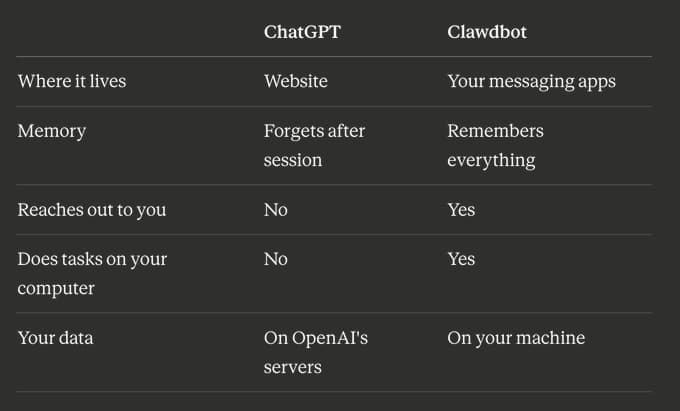
Not exactly. ChatGPT/Claude are model experiences (usually a chat interface). Clawdbot is a wrapper and orchestrator that can use different models under the hood. The “replacement” is more about workflow than intelligence: it reduces friction and enables automation.
Do I need to be technical to set it up?
You don’t need to be a developer, but you do need basic comfort with copy/paste commands and configuration steps. If you can follow a checklist in a terminal, you can usually get it running.
Why does everyone talk about Mac minis?
Because it looks cool, feels “serious,” and some people want local compute for privacy or local models. But for typical assistant workflows, the machine mostly routes messages and calls APIs—so a small server can be enough.
Can it run 24/7?
Yes, if you host it on an always-on machine (like a VPS). That’s also what makes proactive messages truly useful: it can check conditions even when your personal laptop is closed.
Is it safe to connect email, calendar, and passwords?
It depends on your setup and how you manage credentials. Treat it like you would treat any automation system: use least-privilege access, separate accounts where possible, and be intentional about what you connect.
If you’re not comfortable granting access, start with non-sensitive integrations first.
