


Are you struggling with robotic drafts that trigger every security scanner? This Walter Writes review explores how to transform stiff machine output into natural, high-quality prose that maintains your original message. Discover how this structural rewriting tool bypasses detection while offering a versatile multilingual engine for professional results.
The essential takeaway: Walter Writes AI distinguishes itself by using structural rewriting and rhythmic variation rather than simple synonym swapping to bypass detectors. This approach maintains the original meaning while achieving up to a 98% human-like score. It is a vital tool for SEOs and professionals needing to humanize AI drafts in over 80 languages, starting at $8/month with a 300-word free trial.
Summary of Our Opinion on Walter Writes AI Detector ⭐4.5/5
The arms race between AI generation and detection has a new heavy hitter. Walter Writes AI functions as both a sophisticated humanizer and a reliable detector. We give it a 4.5/5 rating for its impressive ability to bypass major security tools.
Its real power lies in structural rewriting, not just swapping words. This method avoids the patterns that cheap tools leave behind. The official source even claims a 98% human-like output score.
The results feel significantly more natural than standard GPT-4 drafts. It flows better and sounds less mechanical. Plus, supporting over 80 languages makes it a versatile choice for global creators.
There is one catch: customer service response times. While the technology is top-tier, getting a quick reply from support can be a bit of a wait. It is a small trade-off for the quality.
Is this tool worth your investment? Let’s look closer at the performance. The value depends on your specific workflow needs.
Walter Writes isn’t just a wrapper; it’s a surgical tool for anyone fighting the ‘AI-generated’ label in 2026.
You can test the waters without any financial commitment. They offer a 300-word free trial that requires no credit card. It is a risk-free way to see the results yourself.
Performance varies, but independent tests show successful bypass of GPTZero regularly. It consistently outshines basic paraphrasers. This makes it a serious contender in the current market.
Many users compare it to other walter writes review options. While AI writing tools like Writesonic focus on generation, Walter specializes in the “human” polish. It fills a very specific gap in the writing process.
Ready to see if the cost fits your budget? Let’s dive into the subscription tiers and word limits.
Pricing of Walter Writes AI Detector
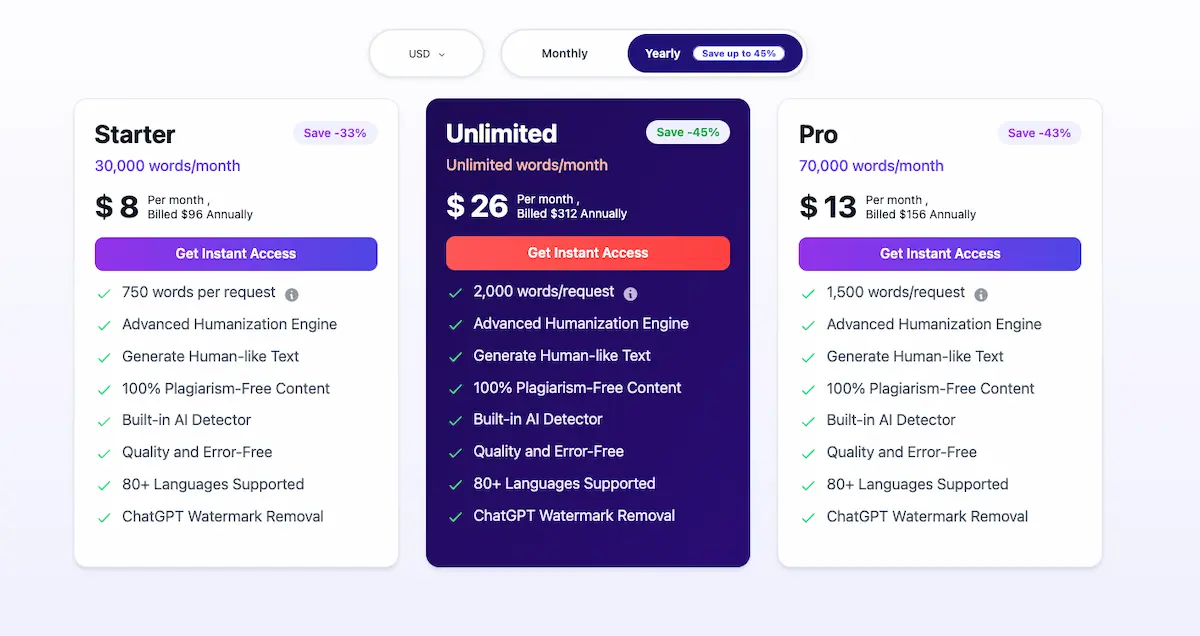
Move from the general opinion to the cold hard cash—how much does this stealth mode actually cost?
Subscription Tiers and Word Limits
The entry-level Starter plan costs $8 per month when billed annually. This budget-friendly tier covers 30,000 words. For heavy users, the $26 per month Unlimited plan removes all monthly word caps entirely. It is a massive jump in capacity.
You can choose between monthly or annual billing cycles. Opting for the annual route saves significant money over time. However, monthly billing is much better for one-off projects. It allows for low-commitment testing before diving in deep.
Walter Writes uses a specific credit system for its operations. Unfortunately, unused credits do not roll over to the next month. You need to be careful about how word counts are calculated per humanization attempt. Every click counts against your balance.
There is a free trial available for skeptics. It offers 300 words, which is enough to test one short article. No credit card is required to start. This makes it a very low-risk way to see the tech in action.
| Plan | Price (Annual) | Word Limit | Best For |
|---|---|---|---|
| Starter | $8/mo | 30,000 | Students & Casuals |
| Pro | $15/mo | 70,000 | Freelancers |
| Unlimited | $26/mo | Unlimited | Content Agencies |
| Enterprise | Custom | API Access | Developers |
Developers can access a dedicated API for high-volume integration. This feature operates under a separate pricing structure. It is built for those needing to scale humanization within their own apps. Contact their team for custom quotes.
Understanding the price is only half the battle. Now, let’s look at whether the results justify the spend. We need to talk about the refund reality.
Value Analysis and Refund Policies
The cost-to-performance ratio is quite interesting here. For students, $8 might feel steep but could protect a grade. For agencies, the unlimited plan is a total steal. It handles massive workflows without breaking the bank.
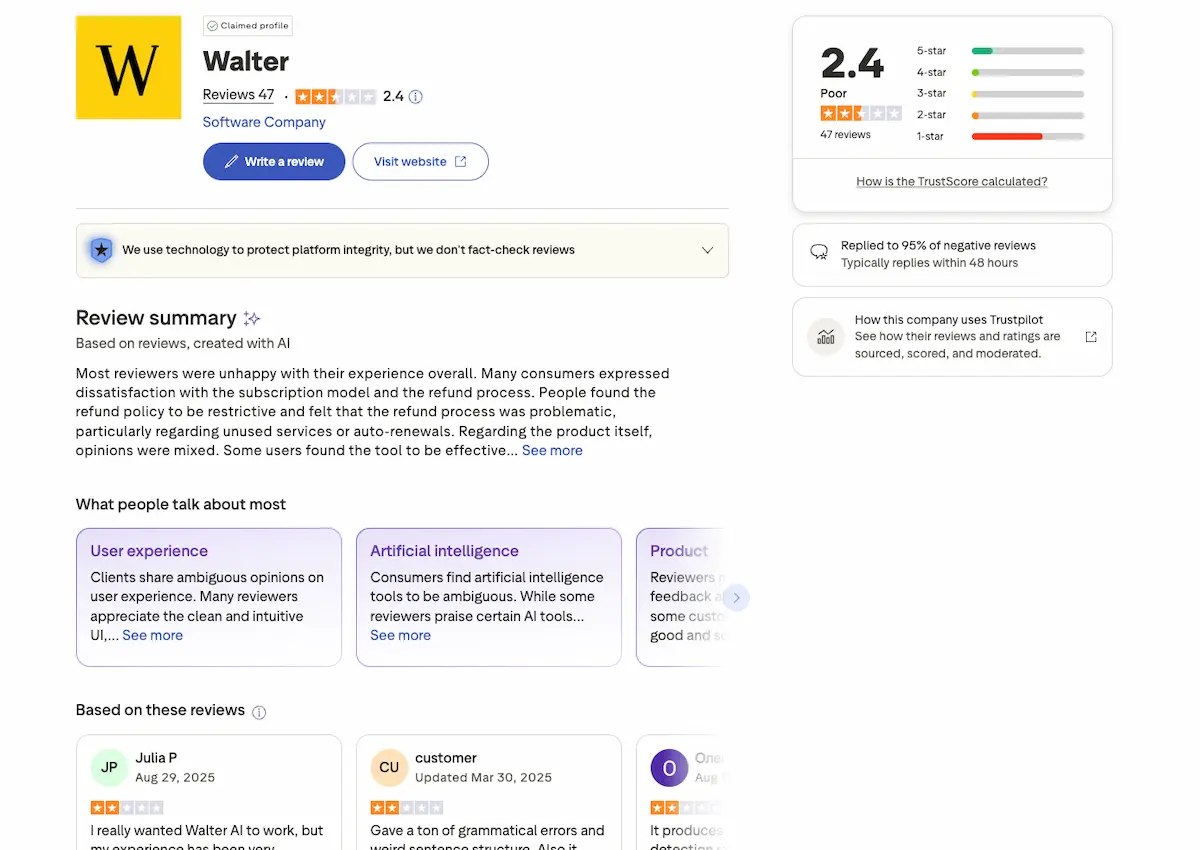
The refund policy is a bit murky and strict. Many users report long wait times for support responses. Billing inquiries often take a while to resolve. You should manage your expectations regarding their speed.
Refunds are only possible under very specific conditions. You must request it within three days of signing up. Also, you cannot have used more than 1,500 credits. Be honest about that “satisfaction” clause before paying.
If you want to cancel, do it early. Aim for at least 48 hours before the cycle ends. Avoid billing misunderstandings by reading the fine print carefully. Don’t wait until the last minute to hit that button.
How does this stack up against the competition? You might want to compare with 1min AI pricing to see the difference. Some tools offer better long-term credit storage than others.
Here is my final tip for you. Use the free trial to its absolute limit first. Never pay until you are sure the output matches your voice. It is the only way to stay safe.
So, who is this tool actually built for? Let’s identify the target audience.
Walter Writes AI Detector: Who Is It For?
Now that we know the cost, who actually needs this tool in their daily workflow?
Content marketers and SEOs are the primary group. They need to ensure their blog posts don’t get flagged by Google’s helpful content updates. High-quality, natural-sounding text is vital for rankings. This tool helps maintain that competitive edge.
Students and academics also find value here. While we don’t condone cheating, many use it to fix “false positives” in their original work. It protects their academic integrity. This ensures their voice remains authentic and clear.
Freelance writers use it to stay professional. It helps them polish AI-assisted drafts into something that sounds uniquely human for picky clients. This process builds long-term trust. It turns robotic outlines into engaging narratives.
Business professionals rely on it for daily communication. Use it for emails or reports that shouldn’t sound like a robot wrote them. It maintains a professional tone. Your clients will appreciate the personal touch.
The versatility of the tool covers several specific needs:
- Students clearing false positives
- SEOs protecting rankings
- Freelancers refining drafts
- Non-native speakers improving flow
Mention the ethical side of these tools. It is worth checking Morgan Alex’s insights on tech ethics to understand the broader impact. Use these features responsibly. Always prioritize honesty in your writing.
Discuss high-stakes submissions with care. Is it suitable for every situation? Use caution and always perform a final human edit. Machines can miss subtle context. Your personal oversight is still required.
Mention the importance of human oversight. Don’t just click “humanize” and submit. Polish the output yourself. Adding your own unique perspective is irreplaceable. This creates the best possible final result.
Transition to the technical mechanics of the tool. Understanding how it works helps you use it better. Let’s look at the underlying logic. The process is quite sophisticated.
“The tool acts as a bridge between cold machine logic and the nuanced warmth of human expression.”
Structural Rewriting vs Synonym Swapping
To understand why Walter Writes works, we need to look under the hood at its linguistic engine.
The Mechanics of Linguistic Transformation
Most basic tools simply swap words. They replace “happy” with “joyful” and call it a day. Walter Writes changes the entire sentence structure instead. It moves clauses and shifts the active or passive voice effectively.
Sentence rhythm is a major AI giveaway. Robots love uniform, predictable lengths. Walter Writes introduces “burstiness” by mixing punchy, short sentences with longer ones. This variety mimics the natural ebb and flow of human thought.
This approach directly impacts humanization. By altering syntax, the tool breaks predictable patterns. Detectors like GPTZero look for these specific mathematical regularities. Changing the structure makes the text far harder for them to flag.
The “Enhanced” mode offers the most power. This setting performs the deepest structural work available. It is the most effective choice for content that must pass strict detection. Use it when quality and evasion are both priorities.
Real-world test results on structural changes show significant improvements over simple paraphrasers. The tool handles idioms by adding natural phrases. These are the linguistic touches that robots usually avoid. It makes the final output feel authentic.
However, deep rewriting comes with a trade-off. You must watch the readability closely. Moving from heavy transformation to final polishing is the next step.
Readability vs Detection Evasion
There is always a delicate balance. If you rewrite too much, the text becomes gibberish. If you change too little, the detector catches it. Finding the “sweet spot” is the secret to success.
You must keep an eye on grammar. Sometimes the “humanized” version has slight quirks. Fix these manually to keep the work professional. Never trust a tool to be 100% perfect without oversight.
The “Standard” mode is a great starting point. It is usually the best choice for blog posts. This mode maintains a good flow while bypassing most scanners. It feels natural without being overly complex.
Avoid the trap of over-optimization. Don’t sacrifice clarity just for a 0% AI score. A 10% score is often safer and much more readable. High readability is better for your actual human audience.
You can compare with Ahrefs paraphrasing tool to see different results. I suggest a “human-in-the-loop” approach for the best quality. Use the tool, then read the result aloud to yourself.
Reading aloud reveals awkward phrasing instantly. If it sounds natural to your ears, it will likely pass. Now, let’s look at how the tool performs in real-world scenarios.
Performance Evaluation and Bypass Capabilities
Theory is fine, but how does this tool perform when faced with the industry’s toughest detectors?
Long-form vs Short-form Content Handling
Long-form essays are harder to humanize. The tool must maintain consistency over 2,000 words. Walter Writes handles this better than most. It tracks structural flow across deep sections.
Short-form snippets are much easier. Social media posts offer less data for detectors. Success rates are nearly 100% here. The brevity helps hide common AI patterns effectively.
Meaning maintenance is a priority. In complex technical documents, does it lose the plot? Usually, the core facts remain intact. It avoids the “word salad” effect seen elsewhere.
Consider the 300-word academic essay test. This case study shows how the tool tackles standard assignments. It successfully reduced detection scores while keeping the thesis clear.
A “before and after” analysis proves its worth. The tool adds significant vocabulary variety. It uses unusual expressions to mimic human flair. It breaks the predictable rhythm of GPT models.
Success isn’t just about a 0% score; it’s about the text remaining persuasive and logically sound after the transformation.
For best results, break long articles into sections. Processing 500-word chunks ensures higher quality. It prevents the engine from becoming overwhelmed by context.
It prevents logical drift. Consistency stays high throughout.
Interpreting Detection Scores and Probabilistic Results
Detection scores are not facts. They are probabilistic guesses. GPTZero might say 0% while Originality says 20%. Each tool uses different weighted algorithms for analysis.
Scores vary because of specific patterns. Models look for perplexity and burstiness differently. Walter Writes tries to beat all of them. It targets the lowest common denominators of detection.
Don’t treat a score as definitive proof. Even humans get flagged sometimes. It’s a game of averages. No tool is 100% right every single time.
The “false positive” phenomenon is real. Legitimate writers often sound “too perfect” for algorithms. This tool helps clear these up for honest professionals. It adds necessary “noise.”
You can also use better AI prompts to reduce detection from the start. Combining good prompting with Walter Writes is a winning strategy. It makes the final humanization much smoother.
Explain the feedback loop clearly. Rewrite, scan, and then tweak manually. This iterative process is the secret to a perfect score. Never trust the first output blindly.
Turnitin and Copyleaks remain the hardest to beat. They use massive databases and advanced linguistics. Walter Writes provides a solid fighting chance against them.
Final word on scores. Use them as a guide, not a god.
List of Core Features
Beyond just humanizing, what specific tools does Walter Writes put in your arsenal? It is not merely about swapping words, but rather a complete structural overhaul of how your ideas are presented to the world.
The Humanization Engine and Bypass Modes
The platform offers three distinct levels: Simple, Standard, and Enhanced. Simple works for light edits. Enhanced acts as a “nuclear” option for rewriting. It aims to beat the toughest scanners available today.
The logic focuses on structural changes. It replaces passive voice with active phrasing. The result is a human-centric flow. It avoids the mechanical patterns typical of AI models.
Speed is a major factor here. Humanization happens in just seconds. Even long texts are processed quickly. This makes it highly efficient for users facing tight deadlines.
You can stay productive while humanizing content by letting the engine handle the heavy lifting. This allows you to focus on the core message. It ensures your walter writes review remains objective and thorough.
Once the text is reshaped, the next step is verification. This leads us directly into the integrated scanner.
Integrated AI Risk Detector
The built-in scanner is incredibly convenient. It provides an instant score immediately after humanization. You do not need to copy-paste. Everything happens within the same interface.
The feedback loop is quite smart. If the score remains high, the tool suggests tweaks. It functions as a self-correcting system. This helps you refine the output further.
Accuracy is the main selling point. The tool claims to mirror major detectors. It simulates results from GPTZero and Originality. This gives you a realistic risk assessment.
The scanner includes several vital components:
- Instant scoring for immediate results.
- Multi-detector simulation to predict external flags.
- Highlighted risk areas for targeted editing.
- One-click re-humanization to quickly fix problematic sections.
Understanding the risk is only half the battle. Global reach requires more than just English detection.
Multilingual Support and Tone Adjustment
Walter Writes supports over 80 languages. This is a massive advantage for global brands. You can humanize content in Spanish, French, or Japanese. It works effortlessly across borders.
Tone adjustment is another powerful feature. You can choose professional, academic, or casual styles. The tool adjusts the vocabulary used. It ensures the intent matches the final output.
For non-native speakers, this is a lifesaver. It fixes awkward phrasing effectively. It helps writers sound like native speakers. The flow becomes much more natural.
Finding essential productivity tools for writers is key to scaling your content. This tool bridges the gap between raw AI drafts and polished, human-sounding articles. It saves hours of manual labor.
With these features, the tool positions itself as a versatile assistant. Let’s look at what the actual community thinks about it.
Customer Reviews and Real-World Feedback
We’ve looked at the features, but what are actual users saying in the trenches?
Most users praise the bypass success rate. They mention it consistently beats GPTZero. This is the main reason people stay. The technology behind the structural rewriting seems to hold its own against major detectors.
Address the negative feedback. Customer service is the biggest complaint. Long delays and confusing refund policies are common themes. Many users feel ignored when technical or billing issues arise during their subscription.
Mention the billing issues. Some users found it hard to cancel subscriptions. Always use a virtual card if you’re worried. This prevents unexpected recurring charges if the cancellation process feels too clunky.
Share a “real-world” success story. A blogger who saved their site from a Google penalty using Walter Writes. By humanizing their AI drafts, they maintained organic traffic and avoided being flagged as spam.
Check out these user testimonials on billing frustrations. They highlight the gap between tool performance and support. It is a recurring theme across multiple review platforms lately.
Discuss the tool as a learning aid. Some writers use it to see how to improve their own tone. It’s not just for “cheating.” It helps identify mechanical patterns in your drafting.
Effective writing requires more than just tools. Consider LinkedIn networking for writers to grow your career. Building a human brand remains the best long-term strategy for any professional creator.
Mention the importance of reading the Terms of Service. Don’t get caught by surprise word limits. The Starter plan caps at 30,000 words, which can vanish quickly during heavy editing.
Final transition to the verdict. We have weighed the technical wins against the operational headaches. Now, let’s look at the bottom line for your specific workflow and budget needs.
Summarize the mixed sentiment: Great tech, mediocre support. Walter writes review shows a tool that functions well but lacks reliable customer care.
Final Verdict on Walter Writes AI Detector
So, after all the testing and reviewing, where do we stand on Walter Writes?
It’s a powerful tool for anyone needing to bypass AI detection. The structural rewriting is top-tier. It beats simple paraphrasers every time. This approach ensures your message remains intact while sounding natural.
The 4.5/5 rating holds up for performance. However, be wary of the customer support hurdles. It’s a tool for the tech-savvy. You need to manage your own subscriptions carefully to avoid billing surprises.
Use the free trial first. Test your specific content type. If it works, the $8/month plan is a great deal. It offers 30,000 words, which is plenty for most standard projects.
Final recommendation: use it ethically. It’s best as a final polish for your original ideas. Don’t rely on it for 100% of the work. Human oversight is still your best asset.
Always remember to keep your data secure while using AI tools. Protecting your intellectual property is vital. Digital safety should never be an afterthought in your writing workflow.
“In the game of cat and mouse between AI and detectors, Walter Writes is currently the fastest cat.”
Ready to try? Head over to their site and start your free 300-word test today. No credit card is required.
Walter Writes excels at structural rewriting and multi-language humanization to bypass detectors effectively. Start with the 300-word free trial to experience these top-tier results firsthand before choosing a plan. Secure your rankings and professional reputation today by transforming robotic drafts into authentic human expression.
FAQ
How much does a Walter Writes AI subscription cost?
Walter Writes AI offers three main pricing tiers to suit different needs. The Starter plan begins at $8 per month (billed annually at $96), providing 30,000 words. For heavier users, the Pro plan is $13 per month for 70,000 words, while the Unlimited plan costs $26 per month for unrestricted word counts. Each plan includes the advanced humanization engine, integrated AI detection, and support for over 80 languages.
Can I try Walter Writes AI for free before buying?
Yes, you can test the platform’s capabilities without any financial commitment. Walter Writes AI provides a 300-word free trial for new users. This allows you to evaluate the quality of the humanization and the accuracy of the built-in AI detector before choosing a paid subscription. Best of all, no credit card is required to start the trial.
What is the refund policy for Walter Writes AI?
Because it is a digital service with instant delivery, refunds are generally not provided for dissatisfaction or forgotten cancellations. However, new users can request a refund within 3 days of signup if they have used fewer than 1,500 words. This exception only applies to your very first subscription. To request a refund under these specific conditions, you must email support@walterwrites.ai.
Is the text generated by Walter Writes truly undetectable?
Walter Writes uses structural rewriting and linguistic variations to mimic human rhythm, which significantly reduces AI signals. While it is highly effective and often achieves “100% human” scores on its internal scanner, no tool can guarantee 100% bypass of all third-party detectors like GPTZero or Originality.org at all times. We recommend a “human-in-the-loop” approach, using the tool for the heavy lifting followed by a final manual polish.
What does “words per request” mean in the pricing plans?
The “words per request” limit refers to the maximum amount of text you can submit for a single humanization process. The Starter plan allows up to 750 words per request, the Pro plan allows 1,500, and the Unlimited plan goes up to 2,000 words. If you have a longer document, you simply need to process it in sections based on your plan’s specific limit.
Does Walter Writes AI support languages other than English?
Absolutely. The platform is designed for a global audience and supports over 80 languages for its humanization engine. This makes it an essential tool for non-native speakers looking to improve the natural flow of their writing or for global brands needing to maintain a consistent, human-like tone across different regional markets.
