


Finding a reliable leonardo ai review is difficult when you are tired of wasting expensive credits on unpredictable generators that offer zero granular control over your artistic vision.
This guide breaks down how this platform bridges the gap between basic text prompts and professional-grade creative direction by providing a sophisticated suite of tools for every modern digital artist.
You will discover how to leverage the powerful Phoenix model and the versatile AI Canvas to master high-fidelity generation while maximizing your daily token allowance and managing the specific rules of their recurring subscription mechanics and token rollover systems.
The bottom line: Leonardo AI is a sophisticated creative suite that bridges the gap between automated generation and professional design control. Its robust web interface and AI Canvas offer a versatile alternative to Discord-based tools, allowing for precise in-painting and style consistency. This platform enables creators to produce high-fidelity assets efficiently without the technical overhead of local installations. A key differentiator is the generous daily allocation of 150 free tokens, providing a sustainable entry point for exploring advanced features like the Phoenix model and 3D texture mapping.
Summary of Our Leonardo AI Review
Leonardo AI has built a massive reputation in the creative space. It strikes a rare balance between professional control and a clean interface. Many compare it to rivals. Yet, it’s definitely not just another Midjourney clone.
The AI Canvas and Phoenix model are absolute standouts. These tools serve both weekend hobbyists and serious design pros. Honestly, the precision offered here is quite impressive for the price.
Let’s talk money because the structure is actually fair. The daily free token allowance remains a huge draw for newcomers. This leonardo ai review confirms it’s a solid entry point.
Creative direction feels different here, almost like vibe coding for visuals. You can explore more on the UCstrategies Blog for tech insights. It’s about taking total control.
So, is it a vital tool or a shiny toy? It’s a powerhouse for those needing control, as we’ll see next.
Leonardo AI Pricing and Token Mechanics
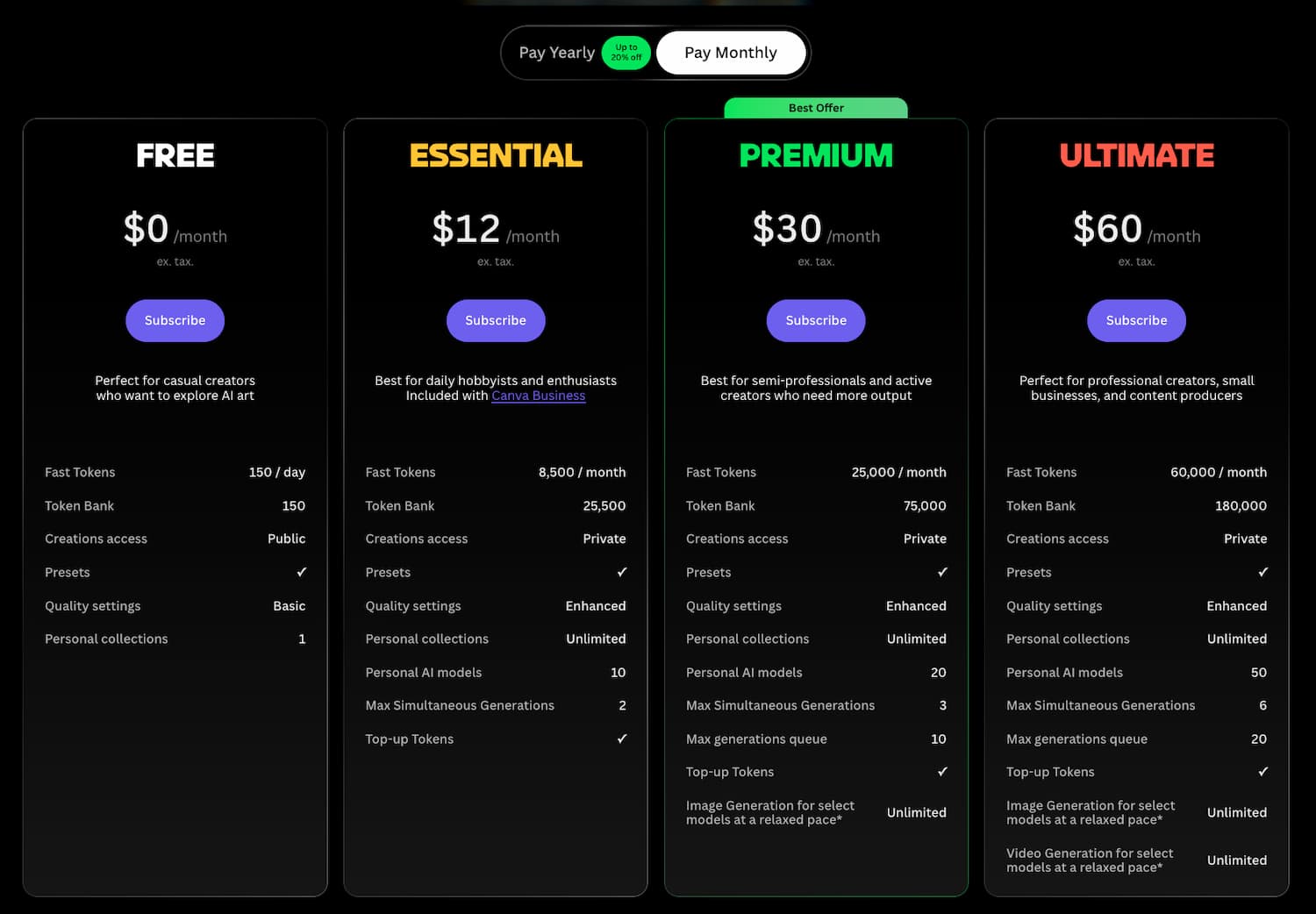
Understanding the cost structure is vital before you start generating, so let’s break down the actual investment required.
Subscription Tiers and the Daily Token System
Leonardo AI offers a solid entry point for newcomers. The Free plan provides 150 daily credits for image generation. These reset every 24 hours for continuous testing.
Paid tiers include Apprentice, Artisan, and Maestro levels. These plans offer faster processing and more concurrent jobs. You also get a token rollover feature. Unused tokens stay active for up to 3 months.
- Free: 150 tokens/day
- Apprentice: 8,500 tokens/month
- Artisan: 25,000 tokens/month
- Maestro: 60,000 tokens/month
Watch your billing cycle closely. Any unused credits are lost upon cancellation, so use them before exiting.
Our Take on the Value for Money
Comparing this to Midjourney reveals a distinct UI advantage. Leonardo uses a clean web interface instead of Discord. This makes the creative process feel much more direct and accessible.
The billing dashboard is very transparent. It is easy to track exactly how many tokens remain. The professional features provide a noticeable boost to your creative workflow.
The $10 to $30 monthly cost matches the high-tier output. Some creators notice an “artificial” look in specific models. But the variety of styles usually compensates for this.
The free tier is perfect for hobbyists. Upgrading is only a requirement if you need massive daily volume.
Leonardo AI: Who Is It For?
Now that we’ve covered the costs, let’s look at who actually benefits from spending those tokens.
Digital artists and social media managers find a real edge here. Crafting striking visuals for posts becomes an intuitive process. This level of creative efficiency keeps workflows moving. It simply works for visual storytellers.
Game developers also have a specific reason to stay. The 3D texture tool handles .OBJ files with ease. It saves massive amounts of time in the asset pipeline.
Marketing teams benefit most from the recent Canva acquisition. This integration makes it a top-tier choice for teams using unified platforms. Brand consistency becomes much easier to maintain.
Using a unified collaboration platform changes the production workflow. It bridges the gap between raw generation and final design. Marketing assets move from concept to reality faster.
Finally, it’s perfect for beginners. If you hate the technical headache of local Stable Diffusion setups, this is your answer.
List of Key Features and Creative Tools
Beyond the users, it’s the specific engine under the hood that makes Leonardo stand out from the crowd.
High-Fidelity Generation with Phoenix and PhotoReal
Phoenix excels where others stumble. It nails text and follows simple instructions with surgical precision. This Phoenix preset for simple word prompts turns basic ideas into polished assets instantly. It’s the heavy lifter for straightforward creative tasks.
PhotoReal targets hyper-realism. Does it work? Mostly. But push it with complex character poses and you might hit “monstrosities.” It struggles when the anatomy gets too tangled or weirdly distorted.
Prompt adherence is top-tier here. The AI prompt enhancer does the heavy lifting for you. Plus, the Character Reference tool keeps your protagonist consistent across every single frame you generate.
Visual professionals often say:
The platform’s ability to maintain style consistency across multiple generations is a significant advantage for visual storytellers and brand designers.
This consistency is a massive time-saver.
These models are artistic powerhouses. Yet, they sometimes lack that specific commercial “soul” required for high-end, picky clients who need perfection.
Advanced Editing with AI Canvas and Elements
The AI Canvas is an infinite playground. You can fix mistakes with in-painting or expand horizons with out-painting. This is where your raw ideas actually become finished, professional pieces.
Elements are the secret sauce. Think of them as stackable LoRAs that tweak the aesthetic DNA. They shift the style dramatically without you having to rewrite your entire prompt from scratch. This allows for incredibly granular control.
The interface is dense. It mirrors the layout logic of professional wireframing tools. It feels built for creators who want control, not just a simple, one-click “generate” button.
Comparing this to the best wireframing tools reveals a similar focus on spatial organization. It’s logical but definitely requires some focused screen time to master.
The editing workflow is a beast. It’s incredibly powerful, though total novices will face a bit of a learning curve initially.
Motion Generation and 3D Texture Creation
The Motion tool breathes life into stills. It creates 4-second clips with a few clicks. Use the “Motion Strength” slider to keep things subtle or go full cinematic.
Game developers will love the 3D texture generation. It’s a massive win for Unity or Unreal workflows. It generates albedo, normal, and roughness maps directly from your text prompts. This streamlines the entire asset creation pipeline.
There is a robust API for the tech-savvy. Professional teams can plug Leonardo’s power directly into their own apps. It’s a pro feature that many users completely miss.
| Feature | Best For | Complexity |
|---|---|---|
| AI Canvas | Editing and Expansion | 4/5 |
| Image Guidance | Style Consistency | 3/5 |
| Motion | Short Clips | 2/5 |
| 3D Textures | Game Assets | 5/5 |
Leonardo is clearly outgrowing the “simple generator” label. It’s evolving into a comprehensive creative suite for serious digital artists today.
Customer Reviews and Support Performance
Technical features are great, but how does the company treat its users when things go wrong?
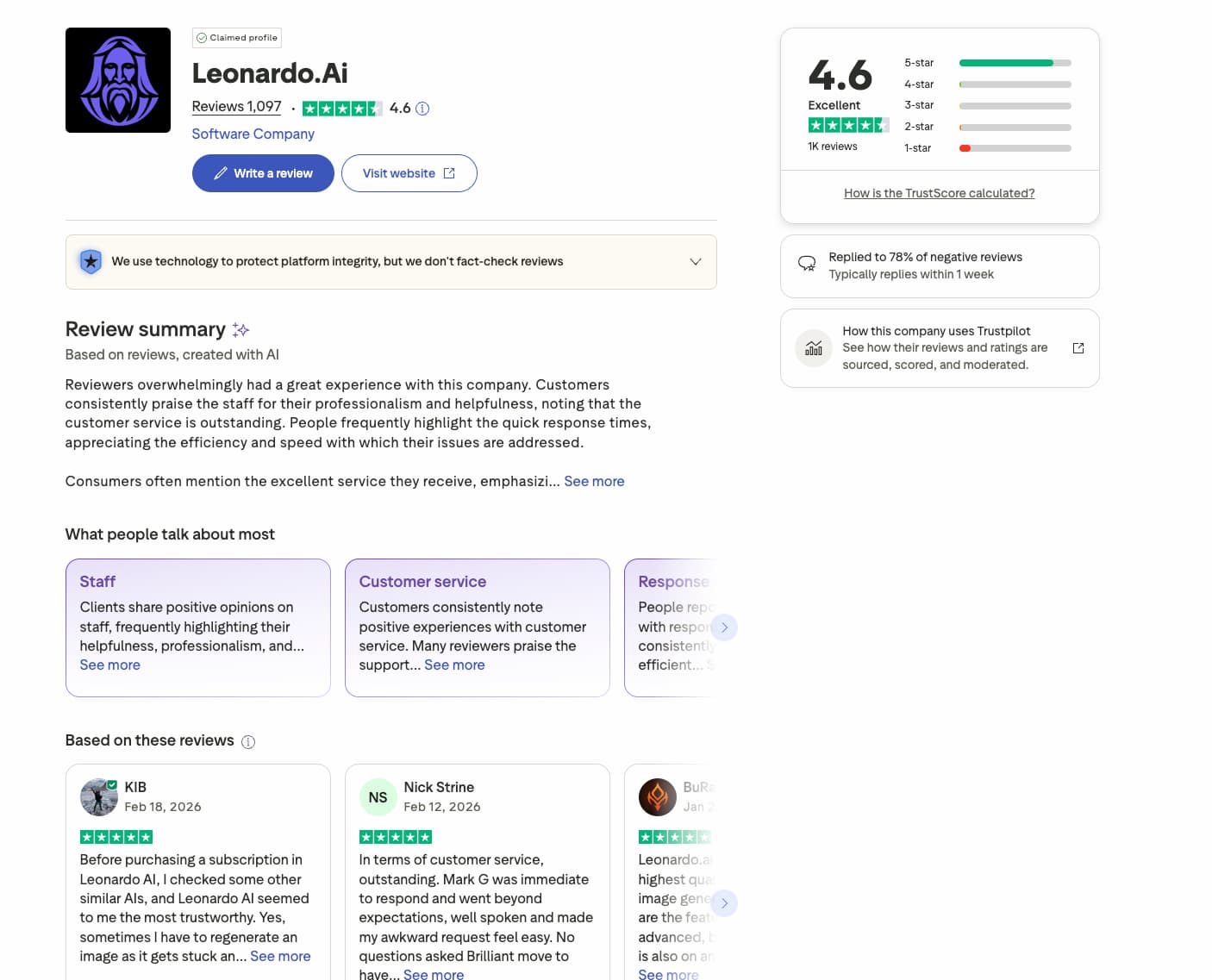
User sentiment stays high with a 4.6 Trustpilot rating. Most creators celebrate the community gallery for its variety. However, some find the “plastic” look of older models a bit dated.
The support team, including experts like Mark G. and Anna, earns high marks for professionalism. Response times usually stay under 24 hours. Paid subscribers naturally get priority assistance during peak times. Free users might wait longer since they lack priority status.
Refunds for accidental renewals can be a sticking point for some. Leonardo AI typically denies requests if you have already consumed significant tokens. Be straightforward with your subscription management to avoid these billing headaches.
Final Verdict on Leonardo AI
So, after all the tokens and testing, where does the platform actually land?
Leonardo earns a stellar 4.6/5 rating for versatility. It is a premier choice for creators demanding granular authority. Its editing tools clearly outmatch Midjourney when precision matters most.
Start with the daily free credits to test the waters. Grab the Artisan plan for consistent, professional-grade control and private outputs.
Leonardo AI bridges the gap between professional control and accessibility through its powerful canvas and Phoenix model. This leonardo ai review suggests starting with your daily free tokens to master these tools immediately. Secure your creative edge today and transform your design workflow for a high-impact digital future.
FAQ
Can I use Leonardo AI for free?
Yes, Leonardo AI offers a very accessible free tier. You receive 150 daily tokens that reset every 24 hours, allowing you to explore the platform’s core features without any initial cost. It is an ideal starting point for beginners to test the image generation quality before upgrading.
What are the different pricing plans for Leonardo AI?
Leonardo AI provides three main paid tiers when billed annually: the Apprentice plan at $10/month, the Artisan plan at $24/month, and the Maestro plan at $48/month. Each tier increases your monthly token allowance, ranging from 8,500 to 60,000 tokens, and offers faster processing for complex tasks.
What happens to my unused tokens if I cancel my subscription?
If you decide to cancel your premium plan, you will lose all unused credits remaining in your Rollover Bank. To maximize your investment, I recommend utilizing your accumulated tokens before the cancellation takes effect, as they do not transfer back to a free account.
How does the Leonardo AI Phoenix model improve image generation?
The Phoenix model is specifically designed for high-fidelity results and better prompt adherence. It excels at rendering text accurately and handling simple word prompts with high detail. Users often report significant improvements in specific textures, such as realistic water droplets, compared to older models.
Does Leonardo AI support 3D texture creation for game development?
Yes, Leonardo AI includes a specialized tool for 3D texture generation. It can create essential maps—including albedo, normal, and roughness—directly from text prompts. This is a powerful feature for game developers using engines like Unity or Unreal who need to streamline their asset pipeline.
Is Leonardo AI’s customer support reliable?
The platform maintains a high Trustpilot rating of 4.6/5, with many users praising the support team’s professionalism. While free users might face longer wait times, paid subscribers generally receive priority assistance, with most technical or billing issues resolved within 24 hours.
How does the token rollover system work?
Paid subscribers can benefit from a Rollover Bank, which saves unused tokens from previous months. Depending on your plan, you can store between 25,500 and 180,000 tokens. These banked tokens are automatically used once your monthly “Fast tokens” are exhausted, ensuring your credits don’t go to waste while your subscription is active.
What happens to unused tokens if I cancel my subscription?
If you cancel your plan, any remaining rollover tokens are lost. To avoid waste, it is recommended to use your stored tokens before cancellation takes effect.
Is Leonardo AI better than Midjourney?
Leonardo AI offers a major advantage with its web interface, AI Canvas editing tools, and granular control. Midjourney may produce more artistic results, but Leonardo is often preferred for professional workflows and precise image editing.
What is the Leonardo AI Phoenix model?
The Phoenix model is designed for high-fidelity image generation and strong prompt adherence. It performs especially well with text rendering, simple prompts, and realistic textures.
Can I use Leonardo AI images commercially?
Yes. Leonardo AI allows commercial use of generated images depending on your subscription and compliance with their terms of service. Always review licensing rules for your specific plan.
Who owns the images created with Leonardo AI?
In most cases, users retain the rights to their generated images. However, content created on free plans may be publicly visible in the community gallery unless privacy settings are enabled.
Is Leonardo AI safe to use?
Yes. The platform includes content moderation and security measures. However, users should avoid uploading sensitive or confidential material, as with any cloud-based AI service.
Does Leonardo AI allow NSFW content?
No. Leonardo AI enforces strict content policies and blocks explicit or unsafe content through automated moderation systems.
What is the AI Canvas in Leonardo AI?
The AI Canvas is an advanced editing workspace that allows in-painting, out-painting, image expansion, and detailed adjustments. It gives creators full control over the final composition.
Can Leonardo AI upscale images?
Yes. Leonardo AI includes built-in upscaling tools that enhance resolution and improve image clarity for professional use.
Can Leonardo AI create videos or animations?
Leonardo AI offers a Motion feature that can generate short animated clips from still images, typically around four seconds long.
Does Leonardo AI support 3D texture generation?
Yes. The platform can generate albedo, normal, and roughness maps directly from text prompts, making it useful for game development in Unity or Unreal Engine.
Can I train my own models in Leonardo AI?
Yes. Advanced users can train custom models or styles using their own datasets, allowing for consistent branding or unique artistic direction.
Is there an API for Leonardo AI?
Yes. Leonardo AI provides an API that allows developers to integrate image generation directly into their applications or workflows.
Can Leonardo AI run locally?
No. Leonardo AI is a cloud-based platform and does not offer a local installation. If you need local generation, tools like Stable Diffusion may be more appropriate.
How do I download images from Leonardo AI?
Generated images can be downloaded directly from the web interface in standard formats, ready for use in design, marketing, or content creation.
Is Leonardo AI good for beginners?
Yes. Its intuitive interface, daily free tokens, and web-based workflow make it one of the most beginner-friendly AI image generators available.
Is customer support reliable?
Leonardo AI maintains a strong reputation, with a 4.6/5 Trustpilot rating. Paid users receive priority assistance, and most issues are resolved within 24 hours.
