


Are you still losing ten hours every single week manually scribbling notes during Zoom calls, or is it time for a fireflies ai review?
This analysis evaluates if the automated assistant eliminates meeting fatigue by testing its 95% transcription accuracy, the AskFred AI chatbot, and its seamless integration with sixty professional business applications.
We reveal whether the productivity ROI justifies the monthly cost and provide specific insights into managing the unique billing structures and security or privacy configurations that often catch even experienced professional users off guard.
The essentials to remember: Fireflies.ai transforms meeting productivity by automatically recording and transcribing calls across all major platforms. This AI assistant eliminates the burden of manual note-taking, allowing teams to focus on active conversation while building a searchable voice database. It offers a significant ROI by saving hours of weekly administrative work. Notably, the tool achieves 95% transcription accuracy and holds a 4.9-star rating on the Microsoft Marketplace, proving its reliability for over one million companies worldwide.
Summary of Our Fireflies.ai Review
Transition: Setting the stage for a deep dive into how Fireflies.ai manages the noise of modern digital collaboration.
Stop drowning in meeting chaos. Fireflies.ai official site acts as an automated AI note-taker that records, transcribes, and summarizes calls for over 1 million companies globally.
My verdict is simple: it is a productivity powerhouse, though it requires some initial configuration. With 95% transcription accuracy across 100+ languages, it handles complex global business discussions with ease.
The “AskFred” assistant is the real standout feature. It transforms your messy calls into a searchable database, making it easy to query specific decisions or follow-up items without scrolling through text.
Security is not an afterthought here. The platform is SOC 2 and GDPR compliant, providing the necessary peace of mind for enterprise users handling sensitive corporate data.
This tool effectively eliminates manual grunt work. It saves hours of time every single week, especially for teams that practically live inside Zoom or Microsoft Teams.
Let’s get into the details. We will examine the pricing tiers, core features, and actual real-world performance to see if it fits your specific professional workflow.
Its 4.9-star rating on Microsoft Marketplace speaks volumes. This level of user satisfaction is rare for AI-driven software.
Fireflies.ai Pricing: Is It Worth the Investment?
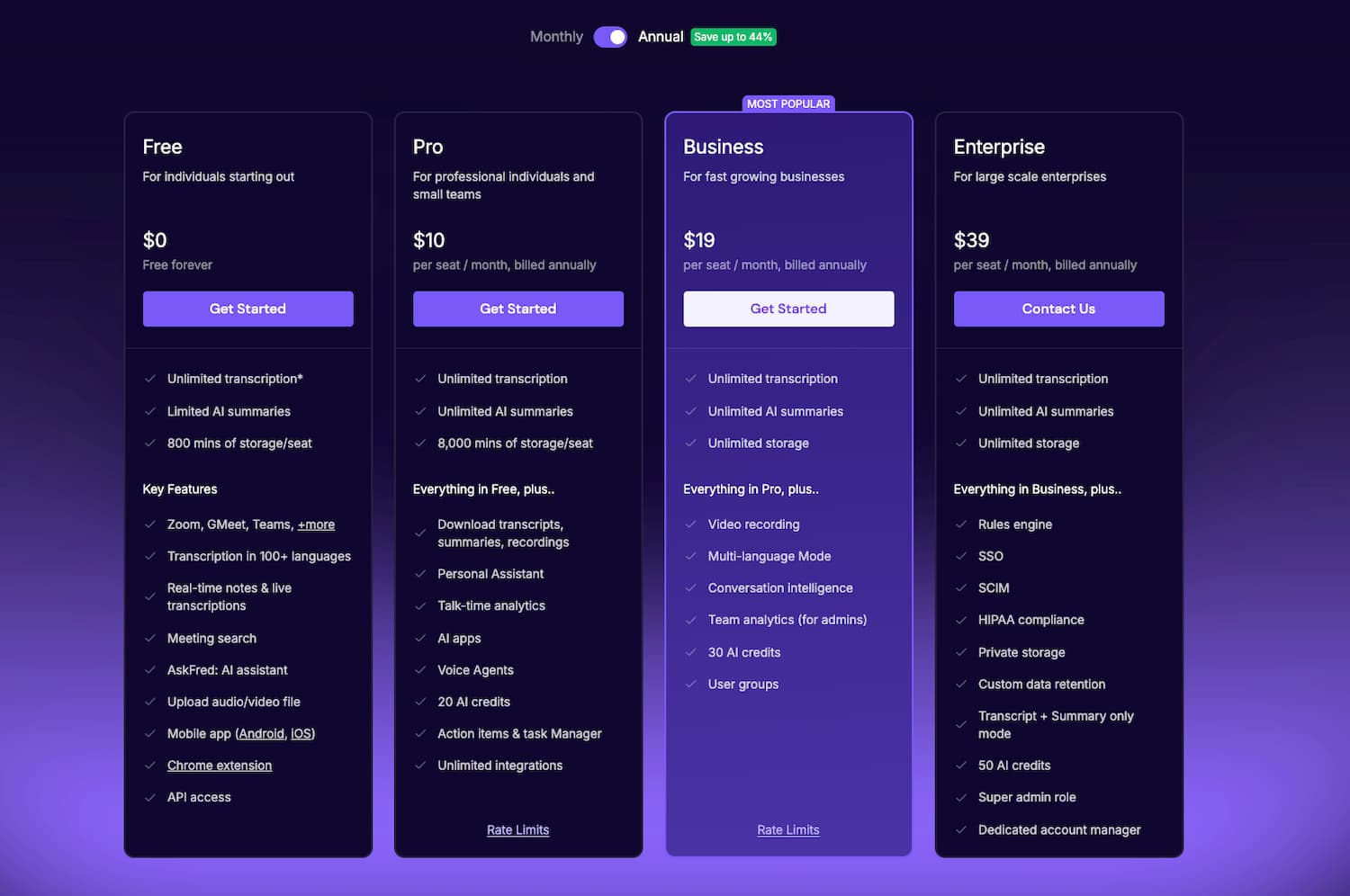
Moving from the general overview, let’s talk about the numbers and whether your wallet will feel the pinch.
The Different Plans and Subscription Tiers
Fireflies scales from a basic Free tier to robust Enterprise solutions. Storage varies wildly between levels. While Pro offers 8,000 minutes, the Business plan grants you unlimited space for recordings.
Video capture remains locked behind higher-tier paywalls. You only get full video treatment on Business or Enterprise plans. AI credits power advanced features like AskFred. These credits handle specialized summaries or deep queries.
The Free version serves as a decent testing ground. However, it lacks the necessary punch for heavy professional workflows. You will quickly hit the 800-minute storage ceiling during busy weeks.
The Business plan stands out as the sweet spot. It provides unlimited transcription and priority support for growing teams. This tier ensures your workflow remains uninterrupted by technical bottlenecks.
Enterprise pricing is custom-built. It targets large-scale deployments requiring maximum security and HIPAA compliance.
Watch out for the “add-on” culture. Specific features might trigger extra charges depending on your usage spikes. Always monitor your AI credit consumption to avoid unexpected monthly billing surprises.
- Free Plan: Limited credits, 800 mins storage
- Pro Plan: $10/mo, 8k mins storage, AI summaries
- Business Plan: $19/mo, Unlimited storage, Video screen recording
- Enterprise: Custom pricing, HIPAA compliance
Our Honest Take on Fireflies.ai Value
Choosing annual billing over monthly payments is a smart move. You save roughly 44% with a yearly commitment. It is a standard tactic that significantly rewards long-term users.
Managing “seats” requires a strategic approach. Adding team members increases your overhead costs very quickly. You must audit your user list to ensure every paid seat actually provides value.
Billing transparency remains a point of contention for some. Users occasionally report that the cancellation process feels clunky or difficult. Always review the fine print regarding refunds before you swipe your corporate card.
Focus on the actual ROI. If this tool saves five hours of manual note-taking weekly, the $19 investment is a steal. It is essentially about buying back your professional time.
Many best productivity tools exist today. Yet, Fireflies maintains a competitive edge through its deep feature-to-price ratio.
The Pro plan is the ideal entry point for solo power users. It offers enough features to boost efficiency without breaking your monthly budget.
Who Is Fireflies.ai Actually For?
Now that we’ve cleared up the costs, who should actually be hitting that “Sign Up” button?
Sales teams are the primary winners here. Recording discovery calls and syncing them to a CRM is a massive advantage. No lead detail ever slips away.
Project managers benefit from automated action items. No more “who said what” during weekly stand-up meetings. This clarity keeps development cycles moving fast.
Fireflies.ai is a game-changer for anyone who spends more than 10 hours a week in virtual meetings and hates manual note-taking.
Recruiters can use it for interviews. It allows them to focus on the candidate instead of typing notes. They can share “soundbites” with hiring managers later. This makes the entire evaluation process collaborative and objective.
Agencies managing multiple clients find value. Keeping transcripts organized by “channels” makes billing and tracking history much easier. It creates a clear paper trail.
Educators and students find it useful. Transcribing lectures or research interviews is a breeze. It supports academic workflows well by turning audio into searchable text.
Remote-first companies rely on transparency. When teams are in different time zones, searchable records are vital for alignment. It bridges the asynchronous gap effectively.
Legal or medical professionals have specific needs. The HIPAA compliance option makes it viable for sensitive consultations. It provides secure documentation for patient records.
Contrast this with casual users. If you only have one meeting a month, this is overkill. It’s built for meeting-heavy professionals who need automation.
Deep Dive Into Key Features
Let’s peel back the hood and see what makes this machine tick on a daily basis.
Automatic Recording and Multi-Platform Transcription
The bot syncs with your calendar effortlessly. It joins Zoom, Google Meet, and Microsoft Teams calls automatically. You just set the rules and let it work.
Expect about 95% transcription accuracy during your sessions. It manages heavy accents and technical jargon with surprising ease. The Whisper-based engine remains steady, even when background noise gets distracting.
Use the mobile app for your offline meetings. It records face-to-face conversations and syncs them to your cloud storage immediately. No more manual note-taking during lunch meetings.
Some users prefer a “No-Bot” presence in calls. You can use the Chrome extension or simply upload audio files later. This keeps the meeting interface clean and distraction-free for everyone.
The tool supports over 100 different languages globally. This is a massive win for international teams working across borders. It bridges the gap for diverse, multilingual workforces using ChatGPT audio transcription technology.
Live Assist offers real-time suggestions while you speak. This unique feature helps you stay on track during high-pressure sales calls by providing instant answers.
AskFred Assistant and Integration Ecosystem
Meet AskFred, your new AI sidekick for meeting data. Ask it to draft follow-up emails or pinpoint specific decisions. It saves hours of manual digging through old notes.
The CRM sync is a real lifesaver for sales teams. It pushes notes to Salesforce, HubSpot, or Slack instantly. Your records stay updated without any manual data entry required.
The Soundbites feature lets you turn long audio into short clips. Simply highlight a key section and share it with your team. It is perfect for capturing direct customer feedback or a best ai summary question maker experience.
In 2025, Fireflies launched over 200 mini-apps to sharpen your insights. These tools extract action items or sentiment shifts automatically. It makes your post-meeting workflow much faster, according to this TechCrunch report on Fireflies mini-apps.
Connect your tasks to Asana or Monday.com to stay organized. Pushing action items directly ensures that meeting discussions lead to actual results. No more forgotten tasks after calls.
Channels keep your voice meetings organized and searchable. Think of it as Slack for your audio history, keeping everything tidy and accessible for the whole team.
Conversation Intelligence and Security Standards
Speaker metrics track talk-time and sentiment during every call. Managers use this data to coach sales reps on their performance. It highlights exactly who is dominating the conversation.
Security is a top priority for professional users. Fireflies is SOC 2 Type II and GDPR compliant. They even offer a “Zero Data Retention” policy for those in highly sensitive industries.
HIPAA compliance is available for healthcare professionals. This ensures patient data is handled with extreme care and legal safety. It is a non-negotiable feature for medical consultations and clinical records.
Privacy controls give you full power over the bot. You can set rules to block it from private events or specific email domains. Your calendar stays private and under your control.
Manage your storage by deleting old recordings to save space. You can also export files to your own servers for long-term archiving. It keeps your workspace lean and efficient.
The Gartner Peer Community on AI risks highlights the balance between AI and privacy. Experts agree that managing data risks is vital for long-term success.
| Security Feature | Certification | Benefit |
|---|---|---|
| SOC 2 | Certified | Protects client data integrity. |
| GDPR | Compliant | Meets EU privacy standards. |
| HIPAA | Available | Secures healthcare patient data. |
| Zero Data Retention | Optional | No permanent storage of sensitive info. |
What Do Real Users Think?
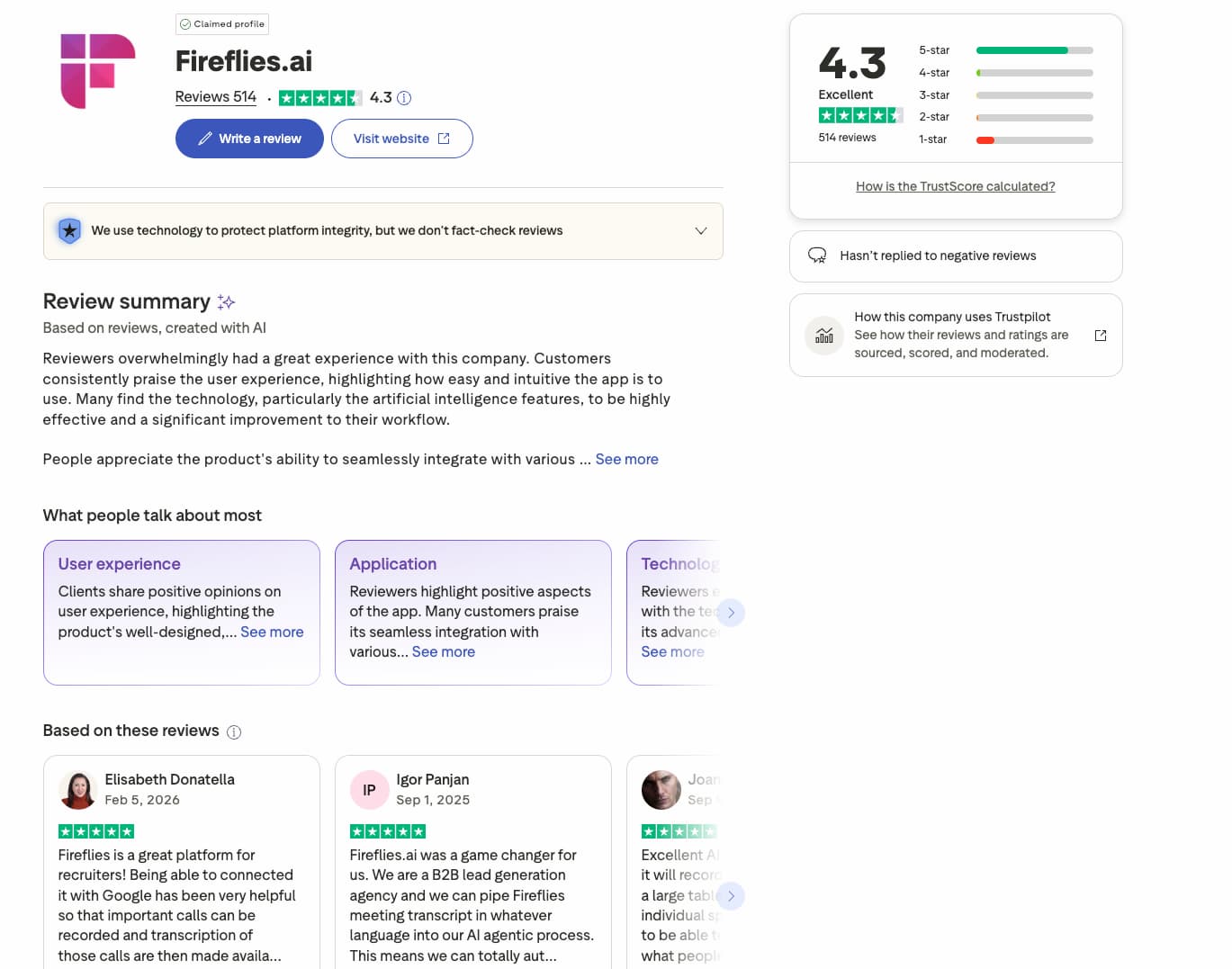
Beyond the marketing fluff, what’s the word on the street from actual power users?
Most practitioners applaud the intuitive setup. The dashboard feels snappy and avoids unnecessary clutter. You won’t need a technical manual to get started.
But the bot’s autonomy sparks some friction. It occasionally crashes private calls uninvited. This creates some rather cringey moments for unprepared hosts.
Transcription accuracy earns solid praise. The AI grasps context even when speakers have thick accents. Users lean on the “search” tool to pinpoint old verbal agreements. It saves hours of manual digging.
Customer service speed remains a mixed bag. Some get instant fixes while others wait days. Your experience mostly hinges on your specific subscription tier.
The platform recently saw 8x user growth. This massive surge confirms the tool tackles a genuine pain point for modern teams.
“Fireflies has become our source of truth for every internal decision. We don’t even take manual notes anymore.” – Verified User.
Final Verdict: To Buy or Not to Buy?
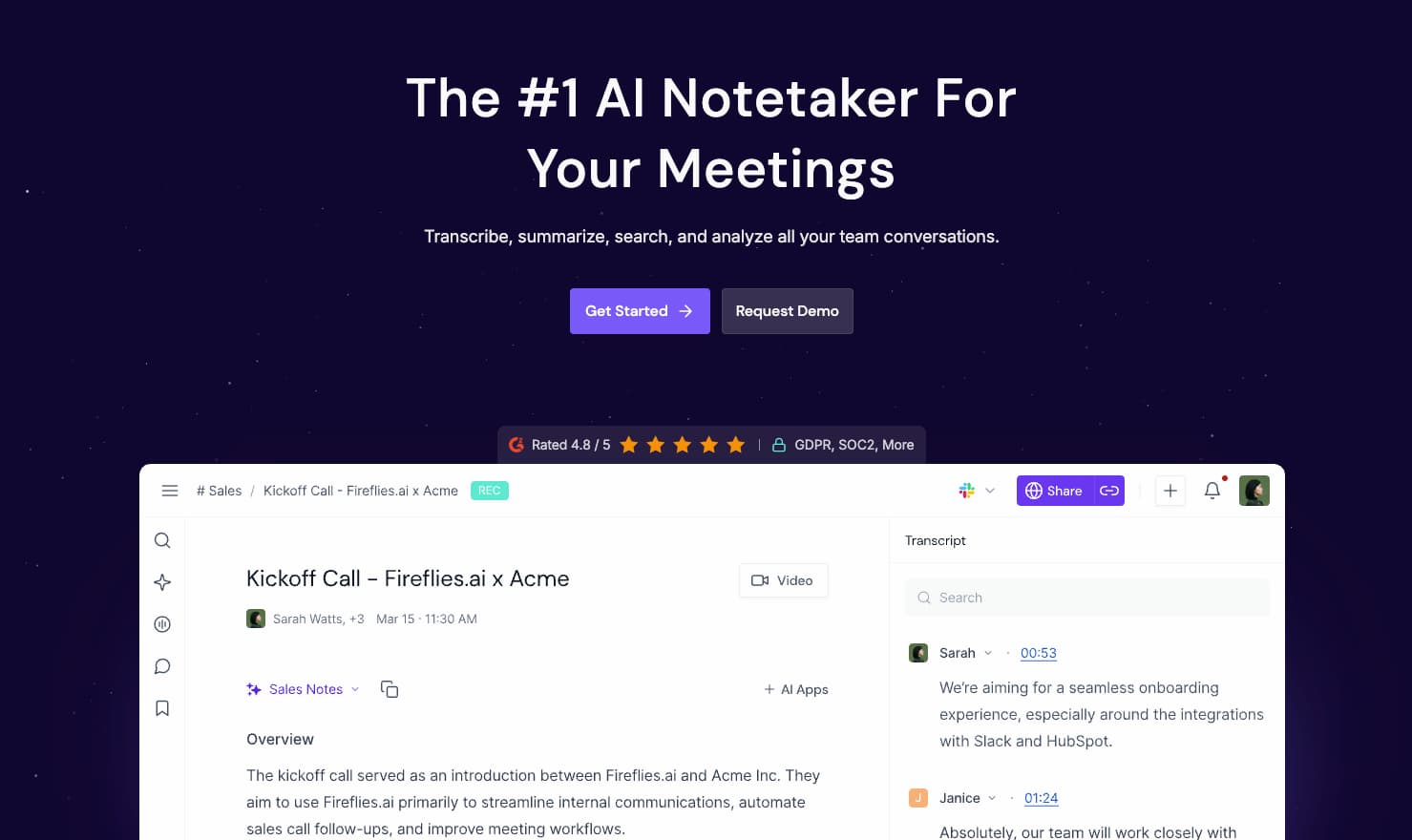
So, after all this testing and analyzing, where do we actually stand on Fireflies.ai?
It stands as a premier pick for busy professionals. Merging automated transcription with sharp AI insights is a winning formula. Few tools handle meeting data this effectively right now.
If workflow integrations and data safety matter, the cost is justified. The Business tier represents the smartest move for growing teams. It offers the best balance of features.
Stay alert regarding those bot entry settings. Dedicate thirty minutes to refining your auto-join filters to prevent privacy slips. This small step blocks future headaches. Try Google NotebookLM for research for other AI needs.
The software isn’t flawless, yet it comes remarkably close. At $19 monthly, the time saved is a massive win. Testing the free version first is a no-brainer.
Fireflies.ai remains a sturdy asset for any modern, meeting-heavy professional environment.
Fireflies.ai masters productivity through precise transcription, seamless CRM syncing, and the powerful AskFred assistant. Start your trial today to reclaim hours lost to manual note-taking. This fireflies ai review marks the end of meeting chaos and the beginning of your high-performance, automated future.
FAQ
Is Fireflies.ai secure and compliant with privacy regulations like GDPR and HIPAA?
Security is a top priority for Fireflies.ai, making it suitable for professional and enterprise environments. The platform is SOC 2 Type II and GDPR compliant, ensuring that user data is handled with high standards of integrity. For users in the healthcare sector, HIPAA compliance is available specifically on the Business and Enterprise plans.
To further protect sensitive information, Fireflies offers privacy controls such as “Zero Data Retention” policies and the ability to set strict auto-join rules. This allows you to manage exactly which meetings are recorded and who has access to the resulting transcripts.
How accurate is the transcription quality for professional meetings?
Fireflies.ai delivers a 95% transcription accuracy rate for most professional calls. The engine is powered by advanced Whisper-based technology, which handles business jargon and various accents with impressive reliability. While performance is high in standard office settings, accuracy can decrease in environments with significant background noise or frequent overlapping speech.
What are the pricing plans and are there any hidden fees to watch out for?
Fireflies.ai offers four main tiers: a Free plan with 800 minutes of storage, a Pro plan ($10/mo per seat, billed annually), a Business plan ($19/mo per seat, billed annually), and a custom Enterprise plan. The Business plan is generally the best value for teams as it includes unlimited storage and video recording.
Regarding hidden costs, users should be mindful of AI credits. These are required for advanced features like the “AskFred” assistant and specialized summaries. Depending on your settings, additional credit packs may be billed automatically if you exceed your monthly allowance. It is also important to note that billing is per seat, and the refund policy is typically limited to a 7-day window with specific usage restrictions.
How does the Fireflies bot behave in meetings and can I hide it?
By default, the Fireflies bot joins meetings based on the auto-join rules connected to your calendar. It appears as a participant, which provides transparency to other attendees. However, if you prefer a more discreet approach, you can use the Fireflies Chrome extension or manually upload recordings after the meeting to avoid having a visible bot in the call.
To prevent the bot from joining private sessions, you can configure settings to only join meetings you explicitly invite it to or those where you are the host. Taking a few minutes to customize these rules is a vital step for maintaining meeting privacy.
Is Fireflies.ai a good investment for sales and project management teams?
The ROI for sales teams is high, primarily due to the seamless integration with CRMs like Salesforce and HubSpot. It automates data entry, allowing reps to focus on the conversation rather than taking notes. For project managers, the tool acts as a “source of truth,” automatically extracting action items and syncing them with task management tools like Asana or Monday.com.
Beyond simple transcription, the platform offers Conversation Intelligence to track speaker metrics and sentiment. This helps managers coach their teams more effectively and ensures that no critical decision or follow-up task is lost in the shuffle of a busy work week.
What is the cancellation policy for Fireflies.ai subscriptions?
If you decide to cancel a paid subscription, your account will automatically revert to the Free tier at the end of your current billing cycle. You will retain access to your existing data and paid features until that period expires. To avoid unwanted charges, it is recommended to cancel through the account settings menu well before the renewal date.
For more information on the tool and its features, you can visit the Fireflies.ai official site.
