

Creating high-quality visual content often means jumping between too many tools. One platform for image generation, another for editing, another for video, and yet another for cleanup or enhancement. That fragmented workflow wastes time, drains creative energy, and slows down production. In this Dzine review, we take a close look at a browser-based AI design suite that aims to solve that problem by bringing everything into one place.
Dzine positions itself as an all-in-one creative workspace built for speed, accessibility, and practical results. Its biggest strength is clearly its AI lip sync feature, which stands out as one of the most compelling tools on the platform for video creators, marketers, and social media teams. At the same time, Dzine also offers a wide set of image and video capabilities, including text-to-image, image-to-image, sketch-to-art, AI image enhancement, AI video enhancement, and face repair and fix tools.
The platform also supports multiple notable models, including Nano Banana 2 and Kling 3.0, with Seedance 2.0 expected to join the lineup soon. That model diversity gives Dzine broader creative flexibility than many single-purpose AI tools. Rather than acting as just another prompt box, it feels more like a practical production hub for creators who want strong output with less friction.
The essential takeaway: Dzine is a versatile browser-based AI design platform that shines brightest with its lip sync capability while also delivering a broad toolkit for image and video creation. With support for models like Nano Banana 2 and Kling 3.0, plus a growing feature set that includes sketch-to-art, enhancement tools, and face repair, it offers a fast and accessible workflow for creators who want professional-looking assets without juggling multiple subscriptions.
What Is Dzine and Why Is It Getting Attention?
Dzine is designed for people who want to create, edit, and enhance visuals inside a single browser-based environment. Instead of forcing users to stitch together separate tools for generation, cleanup, upscaling, and animation, it tries to centralize the most useful creative actions inside one platform. That alone makes it attractive for teams and solo creators who care about efficiency.
What makes Dzine especially relevant in 2026 is that it is not limited to static image generation. The platform is increasingly positioned as a hybrid creative suite for both image and video workflows. This is where the product starts to separate itself from simpler AI art tools. A creator can move from generating an image to improving it, cleaning up details, experimenting with alternate styles, enhancing video quality, or building lip-synced content without constantly exporting and re-importing files elsewhere.
For users who feel overwhelmed by traditional design software, that simplicity matters. Dzine lowers the barrier to entry while still offering enough control to produce polished assets for real-world content production.
Lip Sync: Dzine’s Standout Feature
If there is one feature that deserves top billing in this review, it is Dzine’s AI lip sync tool. This is clearly one of the strongest parts of the platform and the feature most likely to grab the attention of modern creators.
Lip sync has become increasingly valuable for short-form video, faceless YouTube channels, product explainers, promotional clips, and social content that needs to look engaging without requiring a full production setup. Dzine turns that into a much more approachable process. Instead of relying on a complicated editing pipeline, users can create synchronized speaking visuals inside a platform that is already built for rapid asset production.
The practical appeal is obvious. If you create marketing content, UGC-style ads, educational clips, brand storytelling videos, or social snippets, a reliable lip sync tool can dramatically reduce production time. It also opens up creative possibilities for repurposing still images, stylized avatars, or branded visuals into more dynamic video content.
Many AI platforms claim to support video, but only a few offer features that feel directly useful for day-to-day creators. Dzine’s lip sync capability feels like one of those features with clear commercial value rather than just novelty appeal.
Supported Models and Why They Matter ?
Another major strength of Dzine is its support for multiple AI models rather than relying on a single engine. According to the platform information provided, Dzine currently supports Nano Banana 2 and Kling 3.0, while Seedance 2.0 is expected to arrive soon.
This matters because model diversity often leads to better creative flexibility. Different models can excel at different tasks, whether that means motion quality, realism, prompt interpretation, detail handling, or stylistic variation. A platform that integrates several strong models has a better chance of serving a wide range of creative needs without forcing users to maintain multiple external accounts.
Nano Banana 2 and Kling 3.0 already give Dzine a more current and competitive profile in the AI creation space. The upcoming addition of Seedance 2.0 also signals that the product is evolving rather than standing still. That kind of roadmap is important for professionals who want confidence that the tool they adopt today will remain relevant tomorrow.
Core Features Included in Dzine
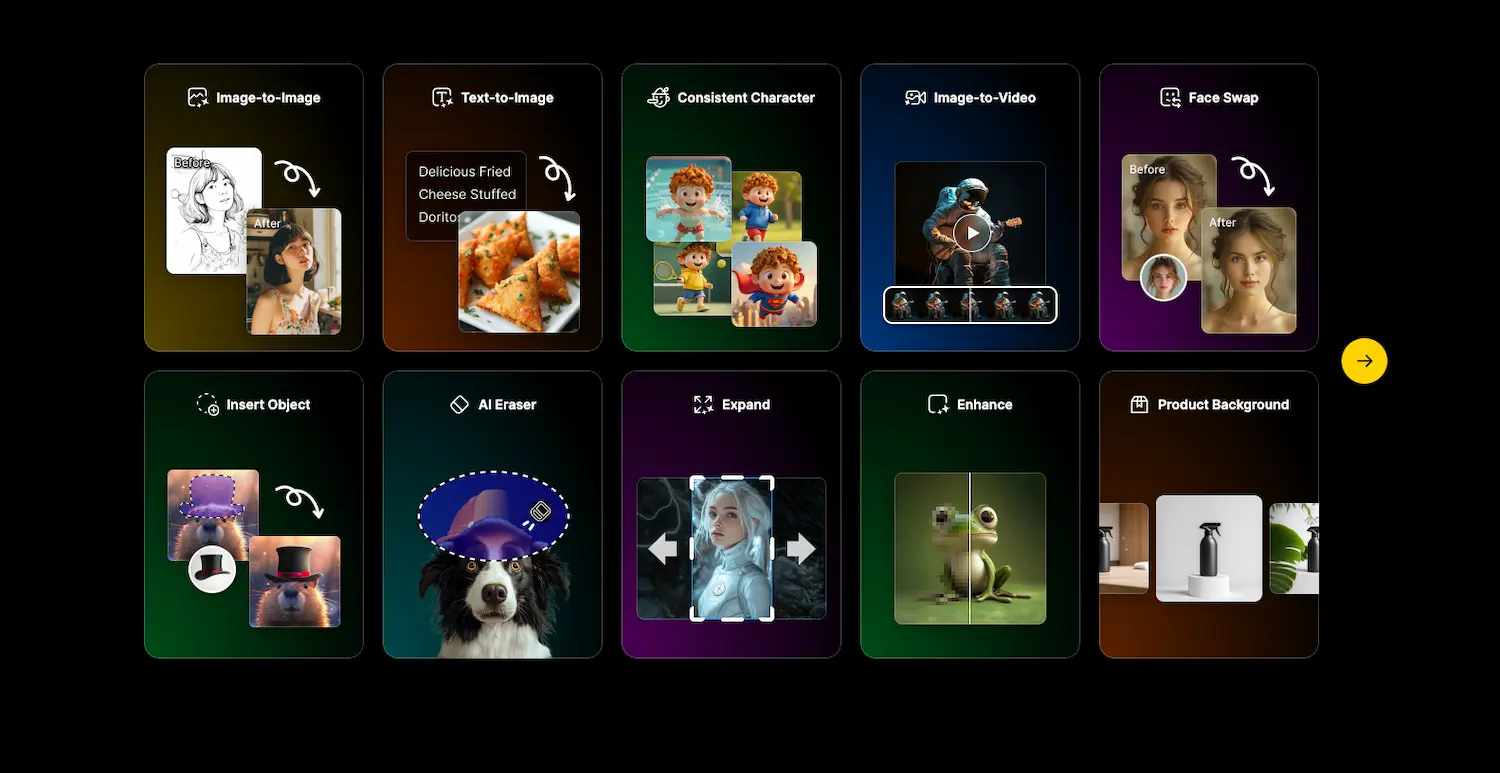
Dzine is not built around one capability alone. The platform presents itself as a broader creative ecosystem, and that wider toolkit is part of its appeal. Here are the most important features that define the experience.
Text-to-Image
Text-to-image remains one of the foundational functions of the platform. Users can generate original visuals from prompts, making Dzine suitable for concept creation, thumbnails, ad creatives, social posts, and branded illustrations. The value here is not only generation itself, but the fact that the image can then be refined within the same ecosystem.
Image-to-Image
Image-to-image tools make it easier to iterate on an existing visual rather than starting from zero. That is especially useful for creators who already have a concept, sketch, mood board, or reference image and want to transform it into a more polished or stylized asset.
Sketch-to-Art
Sketch-to-art is one of the features that broadens Dzine’s relevance for visual creators. Designers, illustrators, and brand teams can take rough concepts and quickly turn them into finished-looking images. That makes ideation faster and helps bridge the gap between raw concept work and presentable output.
AI Image Enhancer
The AI image enhancer is important for creators who need sharper, cleaner, or more refined visuals without manually rebuilding assets in traditional editing software. This can be valuable for ecommerce images, ad creatives, marketing visuals, and any content that needs a more polished final appearance.
AI Video Enhancer
Video quality can be the difference between content that feels professional and content that feels disposable. Dzine’s AI video enhancer adds clear utility for creators who want better-looking output without investing in a more complex post-production workflow.
Face Repair & Fix
One of the persistent weaknesses of AI-generated content has always been facial consistency and facial detail. Face Repair & Fix addresses that pain point directly. Whether the issue is minor distortion, awkward rendering, or a lack of clarity, having a dedicated face correction feature is highly useful for anyone creating character-based visuals or client-facing assets.
User Experience: Fast, Accessible, and Built for Workflow
One of Dzine’s strongest selling points is that it removes technical friction. Because it runs in the browser, users do not need to install heavy software, manage local rendering workflows, or learn a professional editing tool from scratch. That simplicity makes it appealing both to beginners and to time-conscious professionals.
The platform also feels designed around workflow rather than isolated tricks. That matters. A tool can have impressive features on paper and still fail in real production if the user experience is clunky. Dzine’s value comes from how these capabilities connect together. You can generate an image, refine it, enhance it, fix key details, and build it into broader content output without constantly changing environments.
For creators who publish often, that kind of efficiency can quickly turn into a meaningful business advantage.
Who Should Use Dzine?
Dzine is a particularly strong fit for creators who need results fast and do not want to deal with an overly technical setup. Social media managers, content marketers, ecommerce operators, freelancers, solo creators, and small agencies are all likely to find value here.
Video creators should pay especially close attention because of the lip sync capability. That feature alone gives Dzine a stronger identity than many generic AI art tools. If your work involves branded videos, talking visuals, faceless content, or promotional assets, Dzine has a clearer practical use case than platforms focused only on image generation.
At the same time, image-focused users are not left behind. Text-to-image, image-to-image, sketch-to-art, face correction, and enhancement tools make the platform relevant for visual production well beyond video.
Where Dzine Delivers the Most Value?
Dzine is at its best when speed and convenience matter just as much as output quality. It is not trying to replace every corner of traditional professional software for every advanced user. Instead, it aims to give creators a faster way to produce strong results across a wide range of common tasks.
That makes it especially valuable for high-volume environments. Agencies producing frequent social content, creators building daily assets, and businesses that need polished visuals without long production cycles are likely to get the most value from the platform.
The integrated nature of the tool is also a major financial advantage. Even if another platform might outperform Dzine in one isolated niche, Dzine can still win overall by reducing the need for multiple subscriptions and multiple workflows.
Any Weaknesses?
No review would be complete without acknowledging that an all-in-one platform always faces a difficult challenge. The more capabilities a tool offers, the more users expect each of them to be excellent. Some specialists may still prefer dedicated tools for ultra-specific creative tasks, particularly if they work in highly advanced production environments.
That said, Dzine does not need to be the single best tool in every narrow category to be a strong product. Its real strength lies in delivering a broad, useful, and efficient creative toolkit inside one environment. For many users, that practical advantage outweighs the appeal of stitching together a stack of separate specialist apps.
Final Verdict: Is Dzine Worth It?
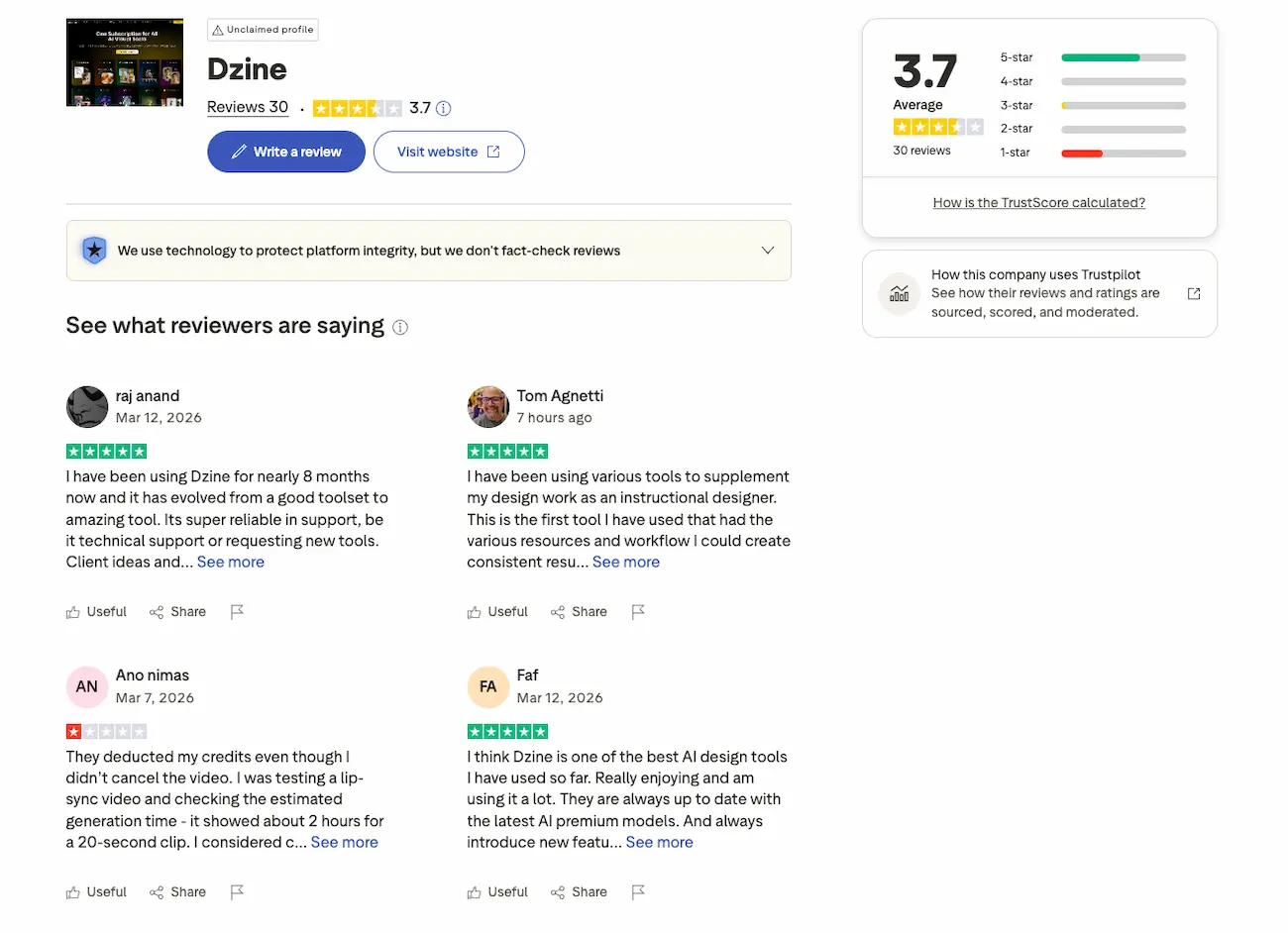
Yes, for the right user, Dzine is an impressive and highly practical AI creative platform. What makes it stand out is not just that it offers many features, but that those features are clearly connected to real production needs.
The lip sync tool is the biggest reason to pay attention. It gives Dzine a sharper identity than many competing platforms and makes it especially relevant for video-focused creators. Beyond that, the support for Nano Banana 2 and Kling 3.0, with Seedance 2.0 on the roadmap, gives the platform additional credibility as a modern multi-model environment.
When you add in text-to-image, image-to-image, sketch-to-art, AI enhancement tools, and face repair capabilities, Dzine becomes much more than a simple generator. It becomes a fast, browser-based content production suite that can genuinely reduce friction for modern creators.
If your workflow includes visual content, short-form video, marketing assets, or AI-assisted design production, Dzine is absolutely worth a serious look.
FAQ About Dzine
What makes Dzine different from other AI design tools?
Dzine stands out because it combines a wide range of image and video tools inside one browser-based platform. Instead of focusing only on generation, it also covers editing, enhancement, facial repair, and lip sync, which makes it more practical for real production workflows.
Is lip sync really the best feature in Dzine?
For many creators, yes. Lip sync is one of the most distinctive and commercially useful features on the platform. It is especially valuable for short-form video, faceless channels, promotional content, and social media creation.
Which AI models does Dzine currently support?
Based on the product details provided, Dzine currently supports Nano Banana 2 and Kling 3.0. Seedance 2.0 is also expected to launch soon, which should further expand the platform’s capabilities.
Can Dzine handle both image and video workflows?
Yes. Dzine is designed to support both image and video creation. Its feature set includes text-to-image, image-to-image, sketch-to-art, AI image enhancement, AI video enhancement, lip sync, and face repair tools.
Who is Dzine best suited for?
Dzine is a strong fit for content creators, marketers, freelancers, social media managers, ecommerce brands, and small agencies that want to create polished assets quickly without relying on multiple separate tools.
