


Are you exhausted from spending hours manually syncing captions and b-roll for a thirty-second clip? This submagic review explores how this AI-powered studio automates the tedious editing process to help you maintain a consistent, viral presence across social platforms.
You will discover how to leverage its 98.9% transcription accuracy and smart transitions to scale your content production without the high cost of a professional editor.
The essential takeaway: Submagic transforms long-form footage into viral short-form content by automating captions with 98.9% accuracy and generating AI-driven B-rolls. This solution eliminates hours of manual editing, allowing creators to scale their social media presence across 50 languages. Notably, users have reported up to a 300% revenue increase through this AI-powered efficiency.
Summary of Our Submagic Review
Editing short-form video used to be a tedious grind of manual keyframing and syncing. Then I tested this tool, and honestly, the speed is staggering. It is a web-based platform used by millions to automate the heavy lifting. Check the Submagic official site for yourself.
The core promise here is simple: creating viral content without the headache. By leveraging AI-powered features, you can turn raw footage into polished social clips in under two minutes. It is built for maximum efficiency.
My verdict sits at a solid 4.6/5 based on current user performance and reliability.
Submagic isn’t just a caption tool; it’s a full-scale AI studio for creators who value their time over manual keyframes.
It bridges the gap between amateur and pro results.
The interface is remarkably intuitive, making it a top choice for beginners. It definitely earns its spot among the best productivity tools for modern digital marketers. You don’t need prior editing experience to start.
Ready to see if the cost justifies the output? Let’s break down the specific features and subscription tiers to find your fit.
Submagic Pricing and Subscription Plans
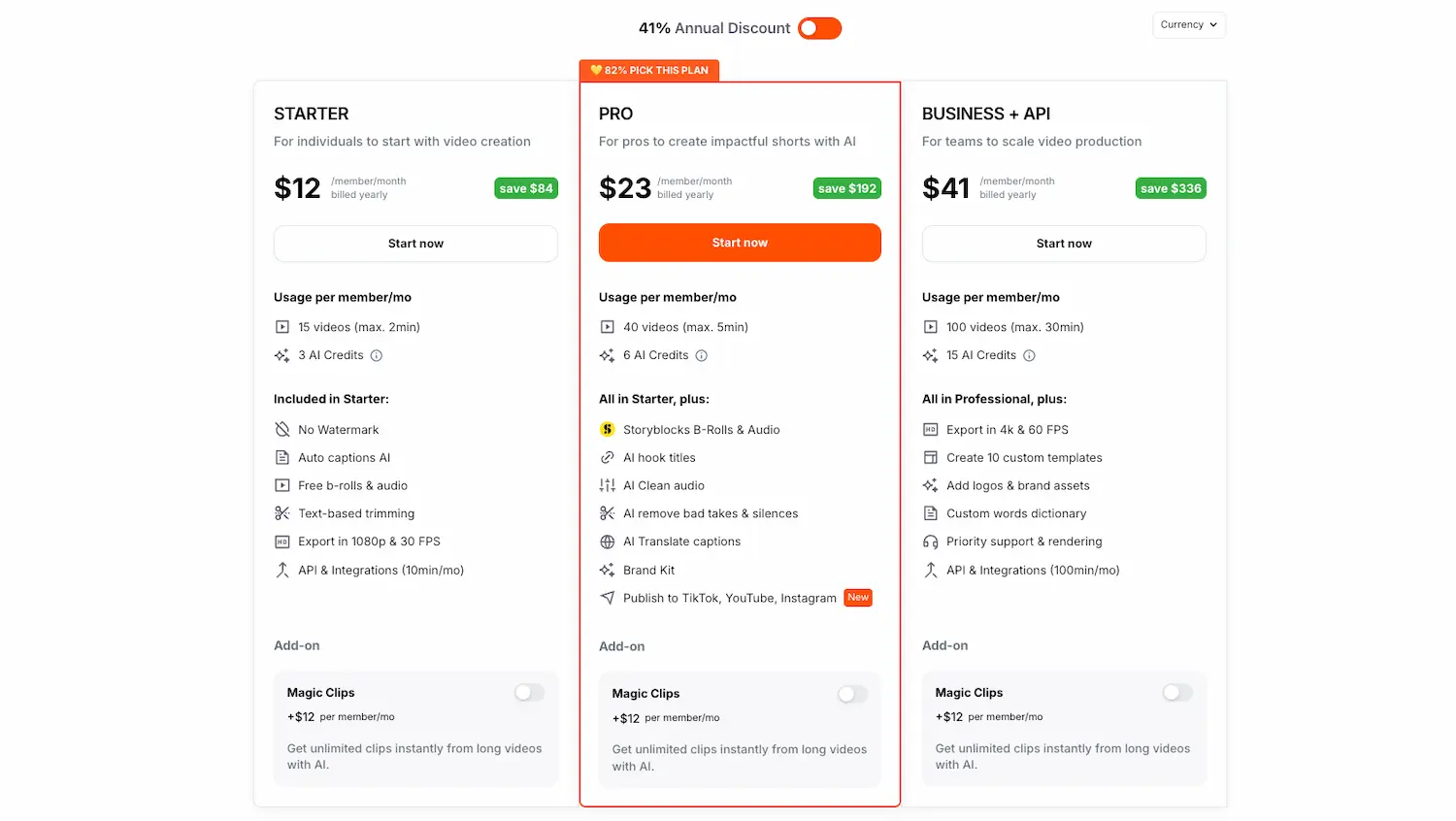
Moving from the general overview to the practical reality of what this tool costs and which plan actually makes sense.
Breakdown of Available Models and Offers
Submagic offers three primary tiers: Starter, Pro, and Business. Each level defines your monthly output, ranging from 15 to 100 videos. Limits on export quality and duration scale up with each specific subscription bracket.
Testing the waters is simple with their free trial. You can generate three videos monthly to explore the interface. However, these trial exports carry a watermark until you upgrade to a paid version.
- Starter plan features: 15 videos, 1080p export.
- Pro plan benefits: 40 videos, Storyblocks access.
- Business collaboration tools: 100 videos, 4K resolution.
Analysis of the Cost-to-Value Ratio
Choosing Submagic is often more cost-effective than hiring freelancers. The immediate ROI comes from slashing turnaround times from hours to mere minutes per clip.
While some find high-tier pricing steep for 4K, professional satisfaction remains high. You can find a detailed professional analysis by Christian Seeto regarding technical performance.
For high-volume creators, the long-term value is undeniable. Saving thirty hours a month justifies the cost. It is a strategic investment for scaling your social media presence quickly.
| Plan | Price | Monthly Credits | Best For |
|---|---|---|---|
| Basic | €19 | 15 Videos | Vloggers |
| Pro | €39 | 40 Videos | Creators |
| Business | €69 | 100 Videos | Agencies |
| Custom | Quote | Custom | Enterprise |
Who Should Use Submagic in 2026?
Now that we’ve covered the price, let’s see if your specific workflow actually fits this AI-driven ecosystem.
TikTokers and Reel creators are the primary targets here. In 2026, the demand for rapid-fire content is non-negotiable. You need tools that generate captions in two minutes. Speed is your only competitive advantage today.
Business owners also benefit by repurposing video for professional networks. It helps you identify who views LinkedIn content effectively. This strategy builds authority without requiring hours of manual editing.
Agencies managing dozens of accounts will value the scalability provided. Handling high volumes becomes simple while maintaining strict brand consistency. It is a logical choice for teams needing high-output systems across multiple client profiles.
Traditional editors might feel restricted. If you crave frame-by-frame manual control, Premiere Pro remains superior. Submagic prioritizes automation over granular creative tweaks.
Core Features for Viral Content Creation
It’s not just about slapping text on a screen; it’s about the specific AI tech that makes content go viral.
Automated Captions and Visual Branding
The AI transcribes speech with a 98.9% accuracy rate. It effectively manages complex technical jargon without errors. This precision saves creators from tedious manual corrections.
You can easily customize fonts and emojis to match your brand identity. These stylistic choices keep your videos consistent. This visual alignment helps in building a recognizable presence.
Submagic supports 50 different languages for global reach. You can find more details on the Submagic features page. It simplifies connecting with a diverse international audience.
Magic B-roll and Smart Transitions
The AI analyzes your transcript to select relevant stock footage automatically. This “Magic B-roll” feature effectively eliminates hours of manual searching. It contextualizes your message by inserting clips, GIFs, or images at the exact right moment.
Auto-zoom mechanics emphasize key moments to maintain viewer focus. Pacing is key for retention on social media platforms. These subtle movements prevent the video from feeling static or boring during long talking segments.
Dynamic sound effects are added to emphasize transitions and B-roll. You might find this similar to the assets discussed in our Artlist review. These audio cues significantly boost the professional feel of short-form content.
Advanced Audio Tools and Translation
The platform handles audio cleaning and silence removal to ensure professional sound. No one likes “dead air” in a short. It automatically strips out background noise and awkward pauses to keep the energy high.
The video translator allows you to reach international audiences instantly. Reaching international audiences is now a one-click task. It supports over 100 languages for translation, making global distribution effortless for any creator.
The AI eye contact feature subtly corrects your gaze toward the camera.
The AI eye contact tool is a literal game-changer for creators who struggle to stay focused on the lens.
It maintains a natural look while ensuring you stay connected with your viewers.
From Raw Footage to Final 4K Export
Having the features is one thing, but how does the actual workflow feel when you’re under a deadline?
Uploading your files is a breeze. The system handles 4K files with impressive processing speed. You can expect a 4K export that maintains high visual fidelity. Everything happens in just a few minutes.
The interface is remarkably intuitive. It avoids endless menu diving by focusing on speed. You won’t feel lost in complex settings. It’s built for creators who need results fast.
Integration is straightforward thanks to a robust API. It fits well alongside the best wireframing tools in your stack. This ensures a smooth transition from planning to final production.
User Experiences and Support Responsiveness
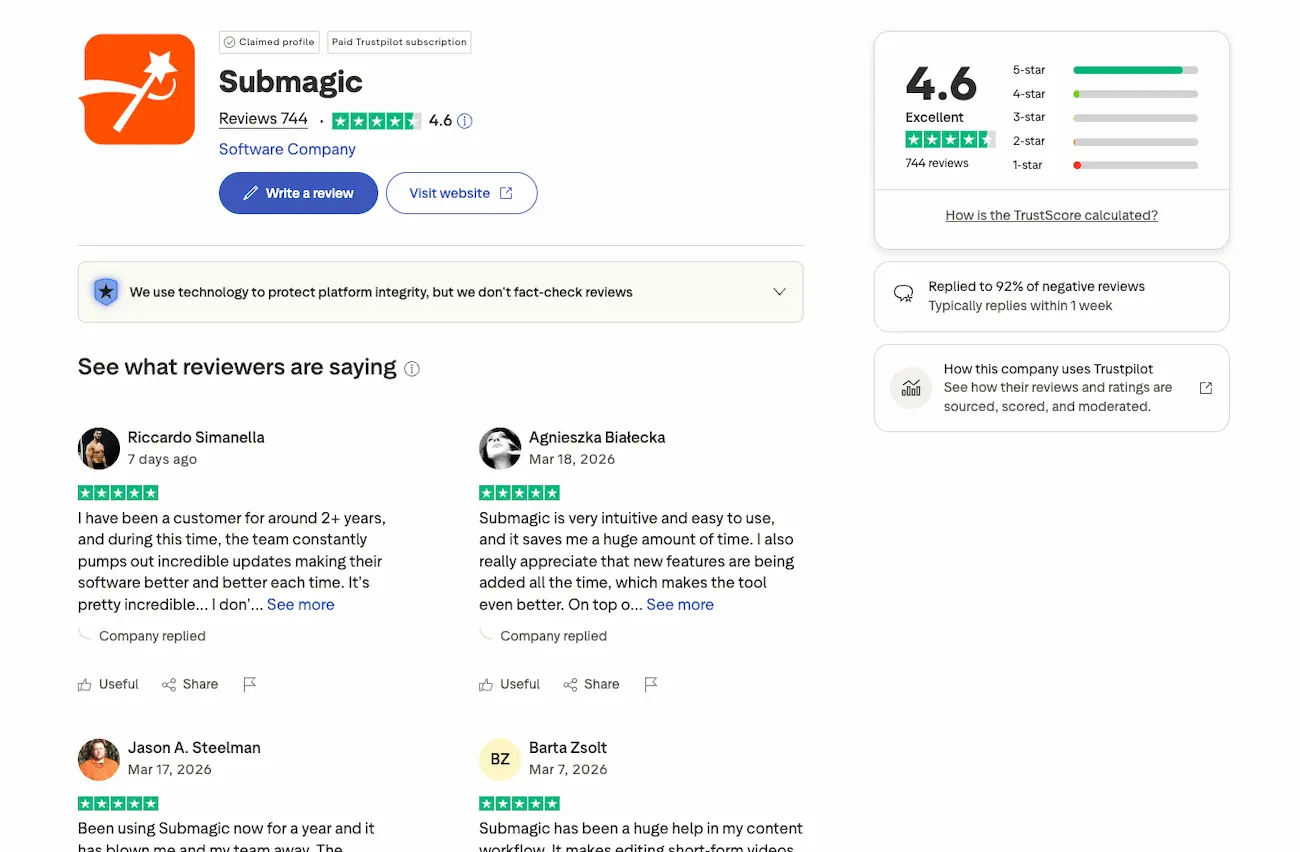
Software isn’t just code; it’s the people standing behind it when things go wrong.
Most users report a stellar experience on Trustpilot, resulting in a strong 4.6 rating. Feedback highlights the impressive speed of caption generation. Generally, the sentiment remains overwhelmingly positive across the board.
Customer support earns high marks for being both friendly and remarkably fast. Agents like Stefan or Mohammad often resolve technical glitches within a week. They even use Loom videos to explain complex solutions clearly.
Handling technical hurdles is straightforward thanks to a proactive team using Crisp for live chat. While some users find the refund policy strict, most issues get fixed quickly. To get the best results, keep these points in mind:
- Common transcription errors
- Export glitches
- Browser compatibility tips
Final Verdict on the investment
So, after all the hype and the feature lists, is Submagic actually worth your hard-earned cash?
My final verdict is a firm yes for serious creators. If you produce short-form content daily, the 98.9% caption accuracy and AI B-roll features justify the cost. It simply outperforms manual editing.
The time-saving benefits are undeniable, turning hours of work into minutes. For agencies scaling a brand, the efficiency gain directly translates into higher output and better ROI. It is a strategic asset.
Submagic is a powerhouse for modern social media growth. To see how it compares to other AI tools, check out my 1min AI review for more insights.
Submagic streamlines viral content creation by automating captions, B-rolls, and transitions with 98.9% accuracy. Boost your social media ROI today by switching from manual editing to this AI-powered studio. Start your free trial now to transform raw footage into professional videos instantly.
FAQ
Is there a free version of Submagic available?
Yes, you can get started with Submagic without any initial investment. The platform offers a free plan that allows you to create up to 3 videos per month, though these will include a Submagic watermark and are limited to 90 seconds in length.
For those looking to test the premium capabilities, the interface frequently offers “Try For Free” options. This is a great way to explore the AI-powered features and see how much time you can save before committing to a paid subscription.
What are the different subscription plans for Submagic?
Submagic offers four main tiers designed to scale. The Starter Plan begins at $19 per month (or $12 if billed annually) for 15 videos. The Pro Plan, at $39 per month, is the most popular choice for professionals, offering 40 videos and advanced tools like eye contact correction.
For larger operations, the Business + API Plan costs $69 per month and includes 100 videos with 4K export capabilities. Agencies with even higher volume requirements can opt for a Custom Plan to tailor limits and seats to their specific workflow.
Can I get a refund if I am not satisfied with Submagic?
It is important to note that Submagic maintains a strict no-refund policy. According to their terms of service, all monthly and annual fees are non-refundable once processed. While you can cancel your subscription at any time to prevent future billing, you will retain access until the end of your current period.
Given this policy, I highly recommend utilizing the free version or the Starter Plan first. This allows you to evaluate the transcription accuracy and the “Magic B-roll” features to ensure they meet your professional standards before making a larger financial commitment.
Does Submagic support high-resolution 4K exports?
High-quality output is a priority for serious creators, and Submagic supports 4K export at 60 FPS specifically within its Business + API Plan. This tier is designed for those who need the highest visual fidelity for platforms like YouTube or professional client work.
The Starter and Pro plans currently support 1080p exports. However, the company has indicated they are actively working on expanding 4K support to lower-tier plans in future updates to better serve the growing needs of the creator community.
How accurate is the AI transcription in Submagic?
The transcription engine is one of the tool’s strongest assets, boasting a 98.9% accuracy rate. It effectively handles technical jargon and supports 50 different languages, making it a robust solution for global creators looking to reach international audiences.
Beyond simple text, the AI also automates the placement of emojis and highlights key terms to boost viewer retention. If the AI does make a minor error, the intuitive editor allows you to quickly jump in and make manual adjustments before exporting.
Is Submagic’s customer support responsive to technical issues?
User feedback on platforms like Trustpilot highlights the support team as a major strength, with a general rating of 4.6/5. Users frequently praise the team for being “real people” who provide helpful, personalized video explanations via Loom to resolve technical glitches.
Response times are typically fast, often within a week or much sooner for critical issues. Whether you have questions about billing or browser compatibility, the support staff—including frequently mentioned members like Stefan and Elie—is known for being professional and solution-oriented.
