


Are you tired of inconsistent feedback or the dread of a false positive flagging your original work? This grammarly ai review examines if the new Expert Review and detection tools actually simplify your workflow or just compromise your unique professional voice.
Discover how to navigate these automated suggestions and ethical dilemmas to ensure your writing remains both polished and authentically yours.
The essential takeaway: Grammarly’s AI suite now offers expert-style feedback, yet its accuracy and ethics remain inconsistent. While the tool helps refine professional tone, its AI detector shows mixed reliability, sometimes flagging human work as robotic. Notably, the “Expert Review” feature has sparked controversy for mimicking authors’ styles without consent, making human oversight vital for maintaining authentic credibility.
Grammarly AI Review: Core Accuracy and Detection Scores
Grammarly has shifted from a basic spell-checker to a heavy-hitting AI suite, but does it actually get the English language right? While the tool remains a staple for many, its evolution into generative territory raises fresh questions about its fundamental reliability.
Precision of Grammar and Punctuation Fixes
Grammarly catches most obvious slips, but it isn’t infallible. Automated corrections often struggle with context, leading to suggestions that feel robotic. You shouldn’t expect “perfect” automation here; the algorithm still trips over complex sentence structures quite frequently.
AI suggestions simply don’t replace manual proofreading yet. Human eyes catch subtle nuances and stylistic choices that algorithms consistently miss. In fact, studies on Grammarly accuracy suggest it misses about 7% of existing errors while flagging correct phrasing as wrong.
Punctuation detection is particularly hit-or-miss. The AI often gets over-eager with commas and semicolons, forcing a rigid structure that can kill your natural writing flow.
Reliability of the Built-in AI Detector
The AI content classifier attempts to distinguish humans from bots, but results vary wildly. It often struggles to identify the line where human editing ends and AI generation begins, leading to inconsistent scoring.
For academic integrity, these scores are merely a signal, not proof of cheating. Relying solely on a percentage to judge a student’s work is risky, as the tool lacks definitive “truth” capabilities.
Detection scores fluctuate because Grammarly updates its underlying models constantly. What looks “human” today might trigger a robotic flag tomorrow as the system learns new patterns of AI-generated text.
Managing False Positives in Academic Writing
False positives occur frequently in scholarly work. Standard academic phrasing and technical jargon often trigger the AI alarm because they mirror the structured, predictable patterns that detectors are trained to flag.
Verifying flagged content requires a paper trail. I recommend keeping detailed draft histories or Google Doc logs to provide concrete proof of your manual writing process if challenged.
These “false alarms” seriously damage the student-teacher relationship. When a tool incorrectly flags honest work, it erodes trust and creates unnecessary tension in the classroom environment.
3 Ethical Issues With the Expert Review Feature
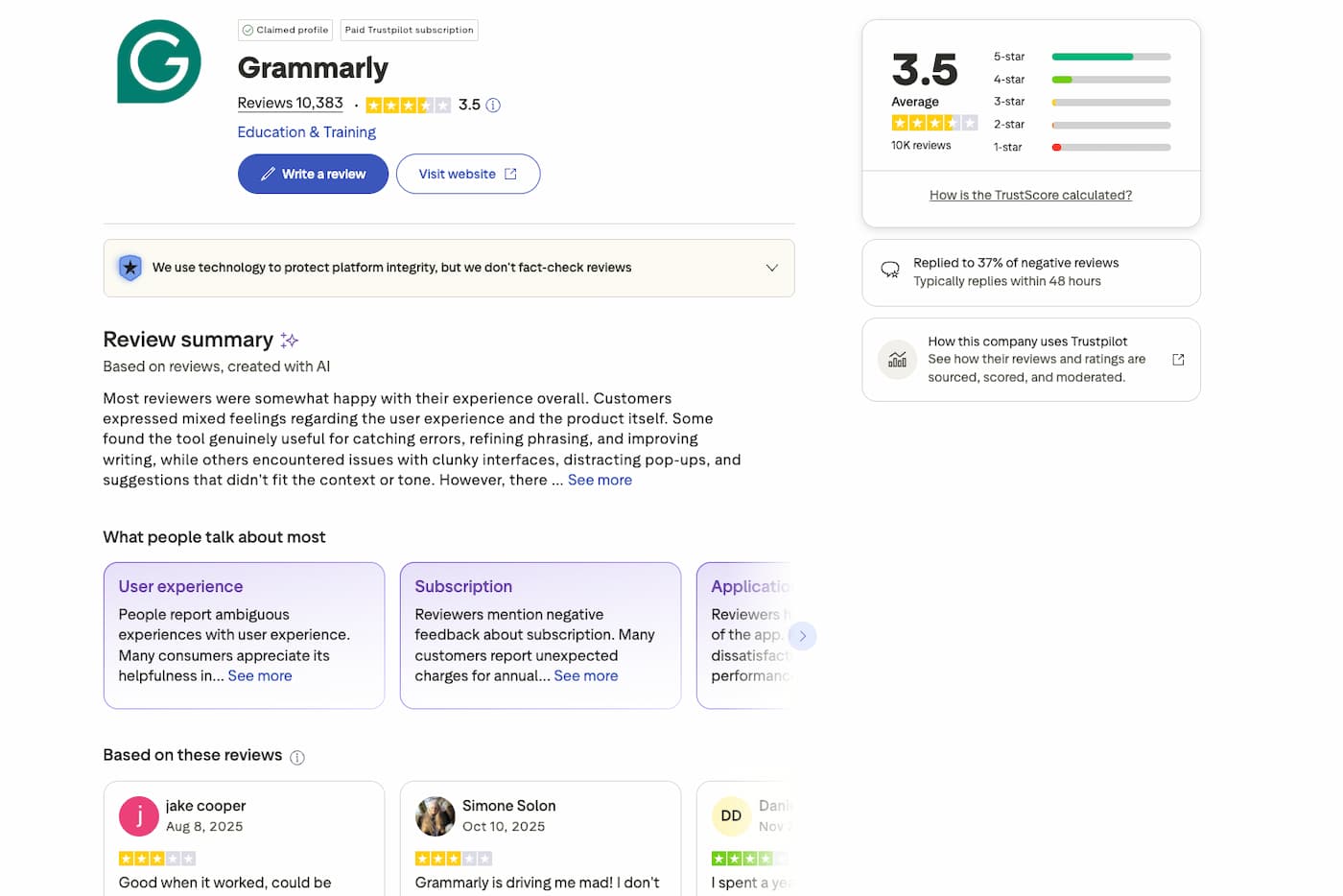
While the technical accuracy is one thing, the way Grammarly “borrows” the voices of famous writers introduces a much thornier set of problems.
Mechanics of the AI Expert Review Agent
The agent simulates expert feedback by analyzing your manuscript against high-level standards. It mimics specific styles, such as tech journalists or famous authors, to provide targeted editorial suggestions. This process helps users adopt an authoritative tone.
Grammarly builds these models using publicly accessible expert content and trusted publications. According to a TechCrunch report on Expert Review, the system references these external sources to shape its feedback. You can even select specific reference points.
The AI then generates revised versions of your sentences. It essentially rewrites your work through a “stolen” lens to match the chosen persona. This automation aims to streamline professional workflows significantly.
Ethical Debate Over Digital Expert Mimicry
Critics often describe this practice as digital necromancy. It feels undeniably strange to use the distinct styles of deceased writers without their say-so. These linguistic models exist entirely outside their original intent.
Living experts also face a lack of consent regarding their intellectual property. As noted by The Verge on identity use, many writers found their names used as “filters” without permission. This raises massive transparency issues.
Legal concerns are mounting as well. Copyright law is still catching up to this “voice theft,” leaving creators unprotected against algorithmic imitation.
Tailoring Feedback to Specific Professional Fields
The tool modifies suggestions based on industry jargon to ensure accuracy. It adapts effectively to complex medical or legal terminology. This helps professionals maintain credibility.
You can also adjust tone settings for academic projects. Switching from “casual” to “formal” modes ensures the text meets strict institutional expectations. It aligns your draft with scholarly standards automatically.
Users can personalize settings for creative writing too. However, be cautious here. AI often struggles with artistic nuance and the delicate emotional depth of human storytelling.
How to Maintain Your Voice While Using AI Suggestions?
If you decide to use these tools despite the ethics, the trick is not letting the machine overwrite who you are on the page.
Cross-Platform Performance and App Stability
To keep your voice, treat AI as a mirror, not a ghostwriter. Accept the logic, but keep your rhythm. This ensures your unique perspective stays front and center during editing.
Performance varies across browsers, and the extension sometimes lags in heavy documents. Chrome users might notice more fluid feedback than those on Safari. Stability remains a key factor for productivity.
Google Docs integration is much smoother than it was two years ago. The sidebar loads faster now. It handles long-form drafting without the frustrating crashes seen in earlier versions.
Balancing AI Prompts With Personal Writing Style
Avoid over-reliance on rewriting features to prevent a robotic tone. You can learn how to use Google NotebookLM to organize thoughts before letting Grammarly refine the final Polish.
Maintain critical thinking at every step. Don’t just click “accept” on every blue underline. Ask yourself if the change actually sounds like you or if it feels too clinical.
Use AI as a guide for clarity. It’s a compass, not a chauffeur for your thoughts. You own the narrative; the tool just helps with the delivery.
Strategies for Non-Native English Speakers
Grammarly assists with language nuances by bridging the gap with idiomatic English. It identifies awkward phrasing that often trips up learners. This builds confidence in professional communication.
Improve vocabulary variety by using the synonym tool. This helps avoid repetitive phrasing without making you sound like a walking dictionary. It suggests natural alternatives that fit the context.
Focus on long-term skill development. Use the detailed explanations provided to learn the rules, not just fix them. This turns a simple correction into a lasting lesson.
Value Assessment of Premium and Business Plans
Finally, let’s talk about the bottom line: is the price of entry worth the features you actually get?
Feature Availability Across Subscription Tiers
The Free version has shifted significantly lately. It now acts primarily as a basic spell-checker, lacking the deep stylistic surgery. You get the essentials, but not the polish.
AI access is strictly metered based on your plan. Here is how the monthly prompt limits break down:
- Free plan: 100 prompts
- Pro plan: 2000 prompts
- Enterprise: custom limits
For power users, the ROI comes from time saved on structural edits. Compare these options against other best productivity tools to see if the specialized writing focus outweighs general AI assistants. It often does for professionals.
Impact of AI on Long-Term Writing Development
“The danger isn’t that AI will write for us, but that we will forget how to write without it.”
There is a real risk of falling into “auto-pilot” mode. When you click “accept all,” you stop analyzing why a sentence failed. This habit can quickly lead to lazy writing and weaker cognitive engagement.
The trick is using suggestions as a learning tool. Treat every single correction as a mini-lesson in grammar to sharpen your own skills over time.
Data Handling and User Privacy Protocols
Privacy is a deal-breaker for many corporate users. Grammarly states they do not sell user data to advertisers for profit. Your text remains your property, which is a vital distinction in the AI era.
The plagiarism checker is surprisingly robust. It cross-references your work against 16 billion web pages and ProQuest’s massive academic databases. This ensures your originality score is backed by actual data, not just guesswork.
| Feature | Free Plan | Pro Plan |
|---|---|---|
| AI Prompts | 100/mo | 2000/mo |
| Plagiarism Checker | No | Yes |
| Tone Adjustments | Limited | Yes |
| Expert Review | No | Yes |
This Grammarly AI review highlights that while the tool excels at refining grammar, its AI detection and “Expert Review” mimicry face significant accuracy and ethical hurdles. To protect your credibility, use these suggestions as a guide rather than an automated pilot. Master your unique voice today to ensure your future writing remains authentically yours.
FAQ
How accurate is Grammarly’s AI when it comes to grammar and punctuation?
Grammarly remains a powerhouse for catching standard spelling and grammar slips, but it is not infallible. While it excels at identifying basic errors, it can occasionally miss subtle nuances that a human editor would catch. Our analysis shows that its automated suggestions are best used as a high-level guide rather than a perfect replacement for manual proofreading.
The tool can be particularly over-eager with punctuation, such as commas and semicolons. For a deeper look at these limitations, you can explore studies on Grammarly accuracy which highlight that the software doesn’t always get the grammar right in complex contexts.
Is the Grammarly AI detector reliable for checking original work?
The built-in AI detector provides a probability score based on linguistic patterns, but it should be viewed as an estimate rather than absolute proof. Tests have shown significant fluctuations, with the same text sometimes receiving wildly different scores. It often struggles with “mixed” content where a human writer has used AI assistance for editing or formatting.
In academic settings, these scores are a signal, not a verdict. Because standard academic phrasing can trigger “robotic” patterns, users should maintain draft histories—such as Google Docs version logs—to prove their work is original and avoid the consequences of false positives.
What are the ethical concerns regarding the Expert Review feature?
The Expert Review feature uses AI agents to mimic the styles of specific professional fields or famous authors to provide feedback. However, this has sparked a debate over “digital necromancy,” as the tool sometimes uses the personas of deceased writers without consent. There are also reports from The Verge on identity use indicating that living experts have found their names used as style “filters” without permission.
While the feature aims to help users think like an expert, the legal and ethical frameworks regarding “voice theft” are still evolving. Critics, including a TechCrunch report on Expert Review, suggest that these AI versions often lack the true depth of the human experts they claim to simulate.
How can I use AI suggestions without losing my personal writing style?
To maintain your unique voice, treat Grammarly as a mirror rather than a ghostwriter. You should accept the logical corrections but remain critical of stylistic changes that disrupt your natural rhythm. Avoid the “auto-pilot” habit of clicking “accept” on every suggestion; instead, ask if the change actually sounds like you.
Using AI as a compass for clarity is effective, but you must remain the chauffeur of your thoughts. For those looking to integrate AI into their research workflow without losing control, learning how to use Google NotebookLM can provide a more balanced approach to managing information and personal style.
Is a Grammarly Premium or Business subscription worth the cost?
The value depends on your volume of work and need for advanced features. The Free plan is now largely restricted to basic spelling and grammar. Premium and Business tiers unlock significant AI capabilities, including full-sentence rewrites, tone adjustments, and a plagiarism checker that scans billions of web pages and ProQuest databases.
For power users, the return on investment comes from the increased prompt limits and strategic suggestions. You can compare these capabilities against other best productivity tools to see which fits your workflow. Here is a quick breakdown of the plan features:
| Feature | Free Plan | Pro Plan |
|---|---|---|
| AI Prompts | 100 prompts | 2000 prompts |
| Plagiarism Checker | No | Yes |
| Tone Adjustments | Limited | Yes |
| Expert Review | No | Yes |
