

Are you struggling to predict your monthly overhead while scaling your AI-driven development workflow? Understanding the claude code pricing structure is the first step toward optimizing your budget, whether you choose the $20 Pro plan or the high-capacity Max tiers. This guide breaks down subscription limits, API token rates, and smart caching strategies to ensure you get the highest ROI from your coding assistant.
The essential takeaway: Optimizing Claude Code costs requires balancing the $200 Max plan’s high capacity against the API’s pay-as-you-go flexibility. This strategic choice prevents subscription bloat while maintaining developer flow. Notably, prompt caching remains the most effective saving mechanism, potentially slashing API expenses by up to 90% through efficient context reuse.
Claude Code Pricing and Subscription Tier Breakdown
While many developers start with free tools, moving to a professional setup requires understanding how Anthropic structures its paid tiers to avoid unexpected billing cycles.
Comparing Pro and Max Subscription Tiers
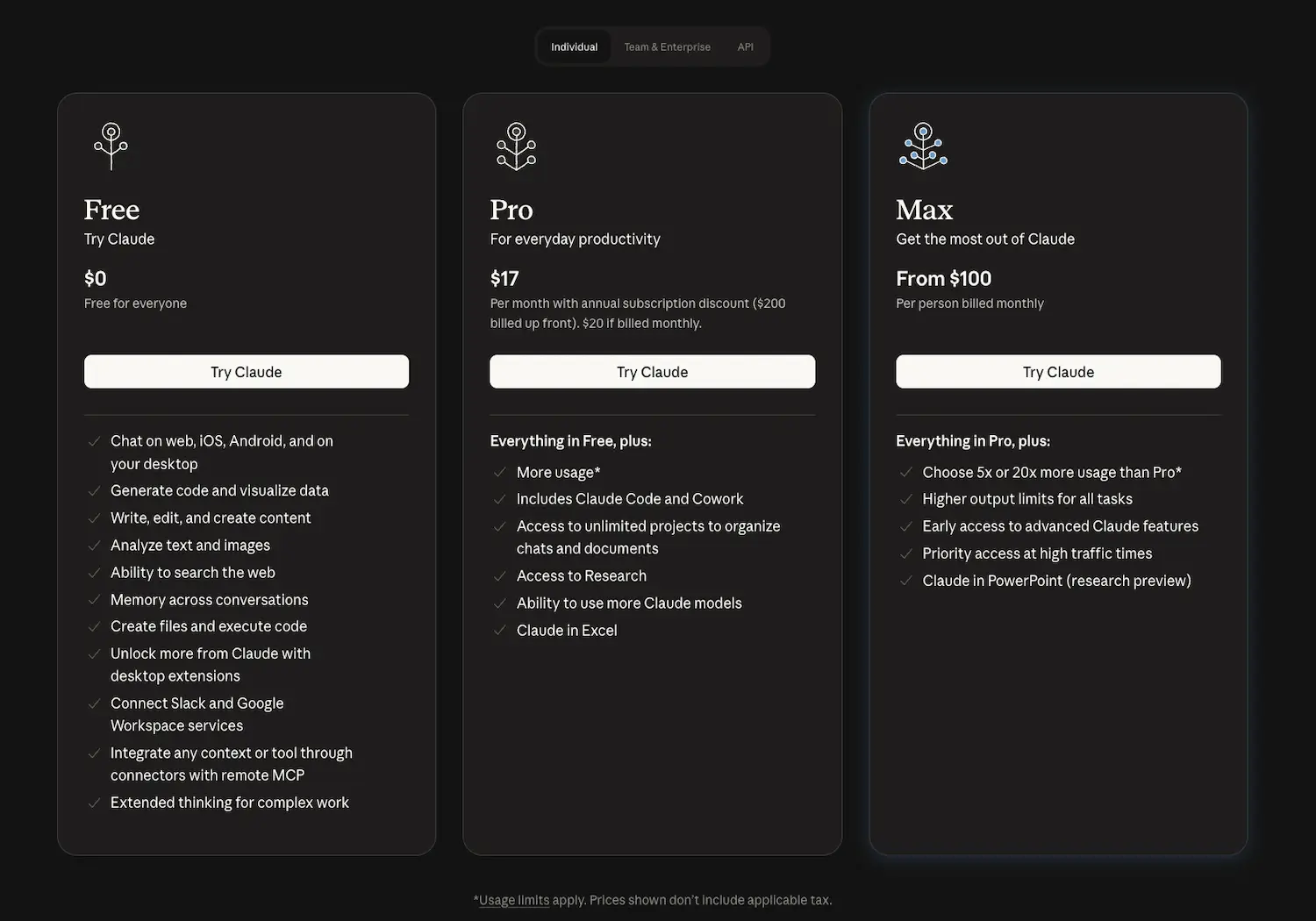
The base Pro plan starts at $20 per month. It offers standard prompt limits, typically 10 to 40 messages every 5 hours, targeting casual individual users.
Max tiers range from $100 to $200 monthly. These plans provide 5x and 20x usage multipliers, offering the high capacity necessary for intense coding sessions without interruptions.
These prices align with 2026 market standards. High-end professional needs justify the cost, as explained in this VentureBeat pricing analysis.
Managing Weekly Caps and Reset Windows
Weekly caps serve as a vital safety net. They prevent users from exhausting their entire monthly quota. Each tier carries a specific throughput limit.
Reset windows operate on a rolling seven-day schedule. Limits refresh based on your session start. Tracking this timing is essential for meeting project deadlines without downtime.
Hitting limits early causes frustration. I recommend checking your dashboard frequently to stay within bounds. Monitoring consumption ensures you never lose access during peak hours.
- Pro Tier: Standard weekly cap
- Max 5x: Five times the base limit
- Max 20x: Highest available throughput for teams
Evaluating the ROI of the $200 Max Plan
Is $200 worth it for a solo dev? Compare this to the cost of an extra engineer. The productivity boost remains the primary deciding factor.
High-performance models like Opus 4.5 require significant resources. Heavy users need the 20x multiplier to maintain flow. This prevents interruptions that break deep concentration.
The break-even logic is simple. If the tool saves five hours monthly, it pays for itself. According to this Hacker News discussion on AI costs, it is a strategic investment.
API Token Costs and Model Performance Trade-offs
Beyond fixed monthly fees, the API route offers a pay-as-you-go model that requires a deeper look at token economics.
Analyzing Token Rates for Sonnet and Opus
Claude Sonnet 4.6 offers a balanced middle ground for most developers. It costs $3 per million input tokens. Output tokens are priced higher at $15 per million.
Contrast this with the heavyweight Opus 4.5 model. Input starts at $5 per million tokens. Output reaches $25 per million for high-reasoning programming tasks.
There is a significant price gap between these models. Choosing the right model for specific tasks is essential for budget control. For more details, see Claude Sonnet pricing and Opus 4.5 details.
Lowering Costs with Prompt Caching
Prompt caching allows the system to “remember” large context blocks. You don’t pay full price for repeated data. This is a massive win for large codebases. It streamlines repetitive queries significantly.
Prompt caching is the single most effective way to slash your API bill when working with massive repositories.
Caching can reduce input costs by up to 90%. It makes long-context conversations much more affordable over time. Frequent users see the most benefit.
This feature is standard in the 2026 API. It rewards efficient prompt engineering. Structured workflows now directly translate into lower monthly bills.
Input vs Output Token Price Disparities
Output tokens cost 5x more than input tokens. Generating text requires more compute than reading it. This technical reality affects how you should structure your requests.
Be smart with model selection. Use Sonnet for quick edits or boilerplate code. Reserve the expensive Opus model for complex architectural changes or deep debugging.
Large context windows also impact your billing. Large inputs remain cheaper than large outputs. Keep your instructions concise to save on the expensive generation side of the equation.
Hidden Factors Influencing Total Token Consumption
It’s not just your prompts that cost money; the background processes of the tool itself can eat into your credits silently.
Accounting for Indexing and Background Ops
File indexing is a core background process. The tool reads your entire project to build a necessary mental map. This startup phase consumes input tokens automatically before you type.
Automated title generation also adds up. Small tasks like naming sessions or indexing metadata create constant micro-costs. These internal operations impact your total monthly token count over time.
Watch out for unignored folders. Large directories like node_modules trigger massive, unnecessary indexing. This oversight can lead to unexpected spikes in your usage bill.
Refining Agentic Loops to Save Credits
Agentic loops are autonomous cycles where Claude attempts to fix bugs. If left unmonitored, the AI might run dozens of iterations alone. This behavior burns through your credits very fast.
You should set a hard limit on iterations per task. Intervene manually if the AI starts looping in circles. This is one of the best productivity tools strategies for cost control.
Use highly specific prompts to guide the model. Clear instructions reduce the need for guessing. Fewer retries mean fewer tokens wasted on failed autonomous attempts.
Monitoring Logs and Privacy Configurations
Monitoring your usage is straightforward but vital. Check internal logs to see credit depletion. Most platforms now provide a detailed breakdown of every cent spent.
Review your privacy and data residence settings. High-security configurations sometimes carry a pricing premium. Ensure your setup aligns with both your technical budget and corporate compliance needs.
Think twice before leaving “Fast mode” on. This setting prioritizes speed over cost-efficiency at all times. Turn it off for routine tasks to stretch your monthly budget further.
Strategic Decision Matrix for Cost-Effective Usage
To truly master your spend, you need a clear strategy on when to use the web interface versus the raw power of the API.
Hybrid Usage and Fast Mode Efficiency
Adopt a hybrid approach. Use the web interface for general questions or simple snippets covered by your subscription. Save the API for complex CLI-based tasks.
Watch the “Fast mode” impact. It speeds up responses but can increase the bill. Use it only during “crunch time” or urgent bug fixes.
Switch models manually to save money. Sonnet is enough for 80% of daily coding tasks and costs less than Opus. It handles most logic without the premium price.
Smart developers toggle settings based on complexity. This prevents “subscription bloat.” Check out the best unified communications services for similar scaling insights. Efficiency follows better resource allocation.
Breakeven Analysis for High-Volume Coding
If you spend over $200 on API tokens monthly, the Max 20x plan is better. It provides a predictable flat rate for heavy lifting. No more billing surprises.
Analyze your volume. Light users under 50 prompts per day should stick to Pro. Mid-range users benefit from the API’s flexibility to pay only for consumption.
Claude’s reasoning power often saves more time than cheaper alternatives. ROI is the key metric here. Superior debugging justifies the slightly higher token price.
Scale up only after hitting limits twice in one week. This ensures you never overpay for unused capacity. Your choice depends on actual output, not aspirations.
| User Profile | Recommended Plan | Monthly Cost | Key Benefit |
|---|---|---|---|
| Casual Dev | Pro | $20 | Access to Claude Code. |
| Professional | Max 5x | $100 | 5x more usage capacity. |
| Power User | Max 20x | $200 | Predictable flat rate. |
| Enterprise | Team | $25/user | Centralized billing. |
Mastering your workflow requires choosing between the $20 Pro plan, high-capacity Max tiers, or flexible API tokens. Optimize your claude code pricing by leveraging prompt caching and Sonnet 4.6 for routine tasks to slash costs by 90%. Start small, monitor your usage logs, and scale only when your productivity gains outweigh the subscription investment.
FAQ
How much does the Claude Pro subscription cost and what is included?
The Claude Pro plan is priced at $20 per month (or $17 per month with an annual commitment). This tier is designed for individual developers and casual users, offering significantly higher usage limits than the free plan, access to Claude Code, and the ability to work with advanced models like Opus and Sonnet across web and desktop interfaces.
Subscribers also benefit from priority access during high-traffic periods, early access to new features, and the ability to create unlimited projects. It serves as an excellent entry point for those who need a reliable coding assistant without the complexity of managing direct API billing.
What are the pricing tiers for the Claude Max plan?
The Claude Max plan starts at $100 per month and is built for power users and professional developers who require high-volume throughput. This subscription provides between 5x and 20x the usage capacity of the standard Pro plan, making it ideal for intense coding sessions and large-scale project refactoring.
By opting for the Max tier, users gain higher output limits and the most generous weekly caps available. It is a strategic choice for those who find themselves hitting the standard Pro limits frequently and need a predictable flat-rate cost for heavy daily workloads.
How does Anthropic structure its API token costs for different models?
Anthropic uses a pay-as-you-go model for its API, charging per million tokens (MTok). For the latest 4.5 generation, Claude Opus costs $5/MTok for input and $25/MTok for output. Claude Sonnet is more economical at $3/MTok for input and $15/MTok for output, while Claude Haiku is the most budget-friendly at $1/MTok for input and $5/MTok for output.
It is important to note that output tokens are consistently more expensive than input tokens because generating text requires more computational power. Developers can optimize spend by using the faster, cheaper Haiku for simple tasks and reserving the high-reasoning Opus model for complex architectural logic.
Can prompt caching help reduce my Claude API expenses?
Yes, prompt caching is a highly effective way to slash API costs by up to 90%. Instead of paying full price to re-process large codebases or long instructions, the system “remembers” these blocks. While writing to the cache carries a small premium (1.25x to 2x the base input price), subsequent “cache hits” or reads cost only 0.1x the standard input rate.
This feature is particularly valuable for developers working within large repositories where the same context is sent repeatedly. By structuring prompts to reuse cached data, you significantly lower the financial overhead of long-context conversations and complex agentic workflows.
What is the difference between usage limits and length limits in Claude?
Usage limits refer to how often you can interact with Claude over a specific period, such as daily or weekly messages. If you hit this cap, you must wait for the reset window or upgrade your plan. In contrast, length limits refer to the context window, which is the maximum amount of information Claude can “hold in mind” during a single chat session.
Most paid plans offer a 200,000 token context window, though Enterprise users can access up to 1 million tokens with Sonnet 4.5. Managing these limits effectively involves clearing out unnecessary files from projects and using prompt caching to stay within both your operational budget and the model’s memory constraints.
How can I prevent “agentic loops” from wasting my credits?
Agentic loops occur when an AI autonomously tries to fix a bug over multiple iterations, which can rapidly consume tokens if left unmonitored. To control these costs, you should implement hard budgets per task, such as limiting the number of tool calls or total tokens allowed per session. Intervening manually when the AI appears stuck is also a vital cost-saving measure.
Refining your prompts to be more specific reduces the need for the AI to “guess,” which minimizes unnecessary retries. Additionally, using a hybrid approach—performing simple edits with the cheaper Sonnet model and only switching to Opus for deep debugging—ensures your credit consumption remains efficient and purposeful.
