


If you are struggling with copyright strikes or low-quality stock assets, this artlist review provides the clarity you need to decide if this platform fits your creative production. We examine if the new AI Suite and massive asset library truly justify the subscription cost for your professional workflow while analyzing the strict credit consumption of Nano Banana. Discover why the lifetime license might be your most valuable asset for long-term project security and whether the new monthly credit system is a genuine dealbreaker for your specific creative budget, goals, and daily output.
The bottom line: Artlist.io has transitioned from a traditional stock library into a full-stack creative ecosystem, integrating a powerful AI Suite with over 2 million professional assets. This evolution provides creators with a centralized toolkit for music, footage, and generative AI, though the new credit-based system requires strategic planning. The most critical takeaway for the 26 million users is the strict “no rollover” policy, where monthly credits expire if left unused. Despite this limitation, the platform remains a top-tier choice for its high-quality indie catalog and ironclad licensing security for commercial projects.
Summary of Our Artlist.io Review ⭐ 4.5/5
Creating content in 2026 is a sprint. Artlist remains a powerhouse for modern creators, delivering high-end assets alongside new AI tools. It’s still a top-tier choice for professional workflows.
This library evolved from a music site into a massive ecosystem. Millions of exclusive tracks now serve brands like Google. Yet, the new AI credit system feels confusing for many. Balancing quality with these costs is the main hurdle.
We’re breaking down everything today. From the AI Suite’s “Nano Banana” models to the classic stock catalog, nothing is off-limits. Artlist is an integrated creative platform worth investigating.
Artlist.io Pricing and the Credit System
Moving from the big picture to the actual math, let’s break down how your wallet interacts with their new credit logic.
Subscription Tiers and the AI Suite
Artlist Max bundles everything for heavy hitters, while standalone music or footage plans suit specialists. It’s a choice between a Swiss Army knife and a surgical scalpel for your production.
The AI Suite brings Nano Banana and Nano Banana Pro into the mix for image generation. These tiers cater to creators needing fast, high-quality visuals without scouring stock libraries for hours. It’s about merging traditional assets with synthetic power for modern workflows.
Higher tiers unlock the full vault, including 8K footage and advanced LUTs. Professional editors get the raw materials needed for color grading and high-end cinematic sequences without paying extra fees.
Not ready to pay? The free account lets you test assets with watermarks. It’s a low-risk way to see if the catalog fits your specific aesthetic before the billing starts.
| Plan Type | Key Features | Best For | Price Range |
|---|---|---|---|
| Music & SFX | Music, SFX, Social or Pro License | Social Media Creators | $9.99 – $14.99/mo |
| Artlist Max (All-in-one) | Music, SFX, Footage, AI Credits, Pro License | Professional Filmmakers | From $39.99/mo |
| AI Suite | AI Video, Image, Voiceover, Credit System | AI-First Content Teams | $11.99 – $89.99/mo |
| Enterprise | Custom Credits, Team Members, Business License | Large Agencies & Brands | Custom Pricing |
Our Take on the Credit-Based Model
That 16,500 credit ceiling sounds massive until you start rendering. A single high-res video or a few “Pro” images can take a hefty bite out of that monthly allowance.
Here is the kicker: the “no rollover” policy. Any unused credits simply vanish. For creators with fluctuating workloads, seeing paid-for resources disappear into thin air is a genuine source of friction and frustration.
Transparency is mostly there, but you must be vigilant. Monitoring your dashboard becomes a new chore to make sure you don’t hit a wall right in the middle of a deadline.
To stay efficient, use lower-resolution previews for your initial AI generations. Only burn your premium credits on the final “Pro” version once the composition looks exactly how you want.
The lack of credit rollover is a significant pain point for seasonal creators who might not use their full quota every single month.
Who Should Use Artlist.io in 2026?
Selecting a subscription matters, but identifying if your specific creative workflow aligns with these tools determines the actual return on your investment.
High-volume creators prioritize production velocity. The “Clear List” feature bypasses copyright friction immediately. Advanced search filters identify a perfect sonic match in seconds. This workflow maintains your aggressive posting schedule without legal threats.
Cinematographers find value in the 4K footage library. Unlike generic stock sites, the music feels intentionally composed. These high-end assets elevate indie projects to a professional studio standard.
Marketing firms benefit from robust enterprise solutions. Managing client licenses under one dashboard simplifies workflows. It guarantees total compliance across global campaigns without administrative friction.
Smart creators pair these assets with the best productivity tools. This combination accelerates your entire creative output.
Exploring the Core Features and AI Toolkit
Moving past the brand’s big-name clients, let’s look at the actual toolkit driving these creative workflows and how these assets handle real-world editing demands.
The Traditional Stock Catalog and Search Interface
You get access to over 900,000 professional assets. New content hits the library every single day. Finding the right vibe is fast because the search filters actually understand specific moods and musical genres without any technical fuss.
Technical quality is high. Most footage offers 4K or ProRes. They include professional LUTs, making color grading much simpler for editors working on very tight deadlines.
The music and SFX aren’t generic corporate noise. These tracks come from genuine indie artists. You notice the difference in the high production value and unique textures.
Workflow speed is where this interface shines. It integrates directly with your editing software for quick previews. You can trigger one-click downloads that land straight into your project folders instantly and easily.
- Over 900,000 assets available
- Daily library updates
- 4K and Prores footage options
- High-fidelity SFX for sound design
Nano Banana and Advanced AI Generation Models
Testing Nano Banana reveals some gaps. While marketing looks polished, actual prompt results sometimes struggle with hyper-specific details. It’s better for broad visual concepts than surgical precision.
Artlist pulls in heavy hitters like Sora, Veo, and Kling. Instead of jumping between different websites, you access these third-party models through one cohesive interface. This centralization saves a massive amount of time during the ideation phase for creators.
The AI voiceovers offer solid multilingual support. Most voices sound natural for professional narration. They still lack that final 5% of emotional nuance a human actor provides.
Is this production-ready? For storyboards and social clips, yes. But for high-end work, some AI generations still show minor distortions that require extra cleanup in post-production.
Note that for those using AI prompt generators, Artlist’s internal tools are quite intuitive.
Licensing Terms and the Clear List Feature
The Clear List system is a lifesaver. By linking your YouTube channel, you white-list your content. This stops annoying automated copyright strikes before they happen to your videos.
One big question is the lifetime usage rule. If you publish a video while your subscription is active, it stays covered forever. You don’t need to worry about old projects if you eventually cancel the service.
Freelancers need the Pro license for client work. This tier covers commercial rights. It ensures your clients won’t face legal headaches or takedown notices on their own platforms.
Ownership of AI content is straightforward. You own the rights to anything you generate using Artlist’s AI tools for commercial use. This provides peace of mind for brand campaigns.
Also, Artlist users hold all rights to AI-generated content and they don’t use your creations to train internal models.
Customer Support and Real User Feedback
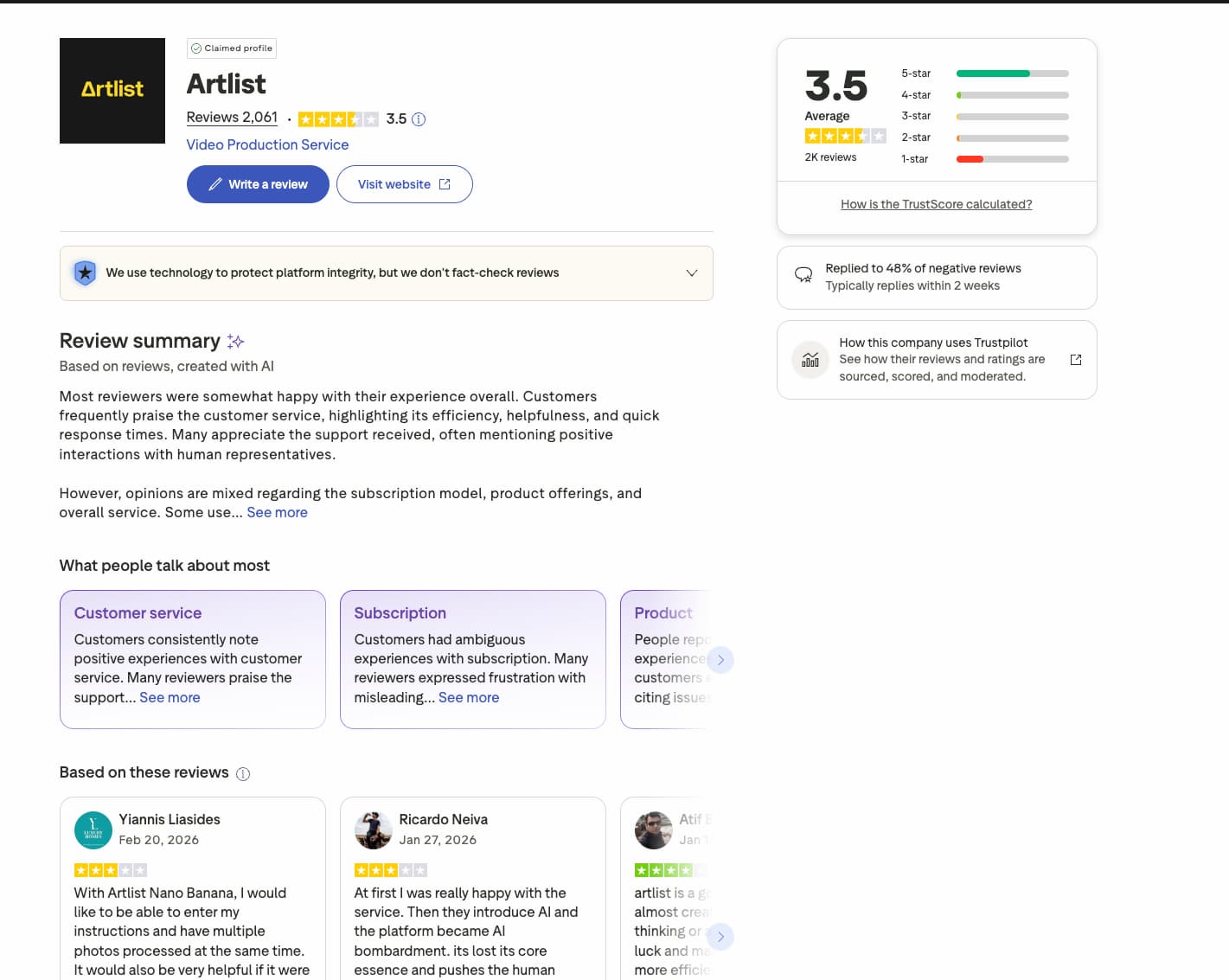
Moving from technical features to the human side of the platform—how they treat you when things go wrong.
Reaching a human isn’t always a sprint. You’ll likely start with a chatbot or the help center first. While often helpful, expect a one or two-day wait for complex replies.
Their refund stance is incredibly strict. You technically have fourteen days to change your mind. But here is the kicker: if you download even one track or generate an image, you’re locked in.
Most grievances center on the AI toolkit’s credit drain. Users report credits vanishing faster than advertised during video generation. Technical hiccups in the AI suite spark occasional frustration among long-term members.
Despite these friction points, over 50 million creators worldwide rely on the service. That volume suggests a solid, dependable infrastructure.
Final Verdict on the Platform’s Value
After weighing the tech against the creative output, the choice becomes quite clear for any professional editor.
It is a definitive yes. For serious creators, the massive library of 2 million assets makes Artlist an easy recommendation. The sheer quality justifies the investment immediately.
Artlist isn’t just a library anymore; it’s a full-stack creative partner that justifies its price tag through sheer variety and licensing peace of mind.
View the AI Suite as a secondary bonus. It is not the primary reason to subscribe. While tools like Nano Banana Pro evolve, the stock catalog remains king. Trust the human-made assets for your main production.
Here is my direct tip. Small creators should start with the Social plan. Upgrade to Pro only when your client list grows and requires broader coverage.
With two million premium assets and cutting-edge AI tools, Artlist provides unmatched creative freedom. This artlist review confirms it is the ultimate workflow solution. Select your plan now to secure lifetime licensing and transform your vision into professional, strike-free content. Your next viral masterpiece starts with this toolkit.
FAQ
How does the Artlist credit system work for Nano Banana and AI tools?
The Artlist credit system operates on a monthly quota that refreshes at each billing cycle. For instance, a standard AI Suite plan might offer 16,500 credits, which covers approximately 103 videos or 1,650 images. It is important to note that unused credits do not roll over to the next month; they expire if not used within the period.
Specific tools like Nano Banana, which is powered by Google Gemini 2.5 Flash, typically cost around 100 credits per image generation. Costs for video generation vary significantly depending on resolution and duration, ranging from 300 credits for a basic 5-second clip to 4,000 credits for high-end Pro video with audio.
What are the main differences between Artlist subscription plans?
Artlist offers three primary categories: Music & SFX, AI Suite, and Artlist Max. The Music & SFX plan is ideal for audio-focused creators, while the AI Suite (available in Starter and Professional tiers) provides tools for generating synthetic voices, images, and videos. Artlist Max is the comprehensive “all-in-one” solution that combines the entire stock library with the full AI toolkit.
Licensing also scales with the plan. The Social plan covers one channel per platform, whereas Pro and Max plans offer broader coverage for client work, commercial projects, and up to three channels per platform. For large teams, the Enterprise plan provides custom credit amounts and dedicated account management.
What are the limitations of an Artlist free account?
A free or trial account on Artlist is strictly for evaluation purposes. You can browse the entire catalog and download assets, but they will contain a watermark. These files are intended only for personal previews and “test edits” to see if a track or clip fits your project before you commit to a purchase.
It is legally prohibited to use watermarked assets in any final project, whether public or private. To remove the watermark and obtain a valid license for commercial or social media use, you must upgrade to a paid subscription plan. You cannot legally monetize or publish any content containing trial assets.
Can I keep using Artlist assets after I cancel my subscription?
Any video or project you published during an active subscription remains covered by the license forever. This “lifetime usage” rule is a core benefit of the platform. However, you cannot use previously downloaded assets to create new projects once your subscription has ended; you must have an active plan at the time of publication.
Some users have reported receiving automated copyright claims on YouTube after their subscription expired. While the license technically protects your existing videos, you may need to use the Clearlist tool or contact support to resolve these automated flags if they occur post-cancellation.
Does Artlist offer a refund if I am not satisfied?
Artlist has a strict refund policy regarding its digital assets. Generally, you can request a refund within 14 days of purchase, but only if you have not downloaded any assets or used any AI credits. Once a download is initiated or a credit is spent, the platform considers the service rendered, making a refund very difficult to obtain.
If you are unsure about the platform’s value, it is best to use the free trial to test the interface and asset quality first. Because the credit-based AI tools consume your quota immediately, testing the AI generation features will likely disqualify you from receiving your money back under their current terms.
